
GoHighLevel vs HubSpot for a Service Sales Team
By MetaTechAi ·
For a ten person service sales team, evaluate GoHighLevel when you want pipelines, calendars and multichannel follow up in one workspace. Evaluate HubSpot when your reporting and connected business tools drive the decision. Both need a named administrator, and the right choice is the one that passes your team's actual workflow tests.
A service business with ten reps may have outgrown spreadsheets and a shared inbox, with somebody needing to pick one system before the next hire starts. This guide compares the daily work: routing a lead, arranging a call, following up, reporting outcomes and maintaining the configuration. MetaTechAi installs AI sales and marketing systems around business workflows, so the CRM decision starts with what the team needs to do, not a feature count.
Should a Ten Person Service Sales Team Use GoHighLevel or HubSpot?
Pick based on what your team does every day, not on which platform has the better demo. If reps work across phone calls, text threads and appointments, start by testing GoHighLevel's consolidated workspace. If your manager needs reports spanning several business records and activities, include HubSpot's reporting tools in the trial. These are evaluation priorities, not a universal ranking. Team size alone does not establish which platform fits or whether you need a full time administrator.
Cost is part of the decision but not the whole of it. Ask each vendor for a scoped proposal covering your users, contact handling, communication usage, required features and support. Separate the base subscription from usage, add-ons and implementation work. Do not assume bundled tools mean unlimited usage, or that a basic CRM account includes every automation shown in a demo. Compare the same operating requirements across both proposals before committing a budget line.
What Does Each Platform Actually Include for a Team This Size?
Both platforms provide CRM capabilities, but a feature's availability depends on the account, subscription and setup. HighLevel's product overview describes pipelines, calendars, funnels and communication tools in one platform. HubSpot also has built-in calling: its call tracking documentation describes browser and mobile calling with HubSpot numbers. It is inaccurate to say HubSpot always requires an external phone tool. Verify the exact channels and automation actions you need.
| Factor | GoHighLevel | HubSpot |
|---|---|---|
| Scope to verify | Account features, communication usage and add-ons | Required hubs, seats, contact handling and add-ons |
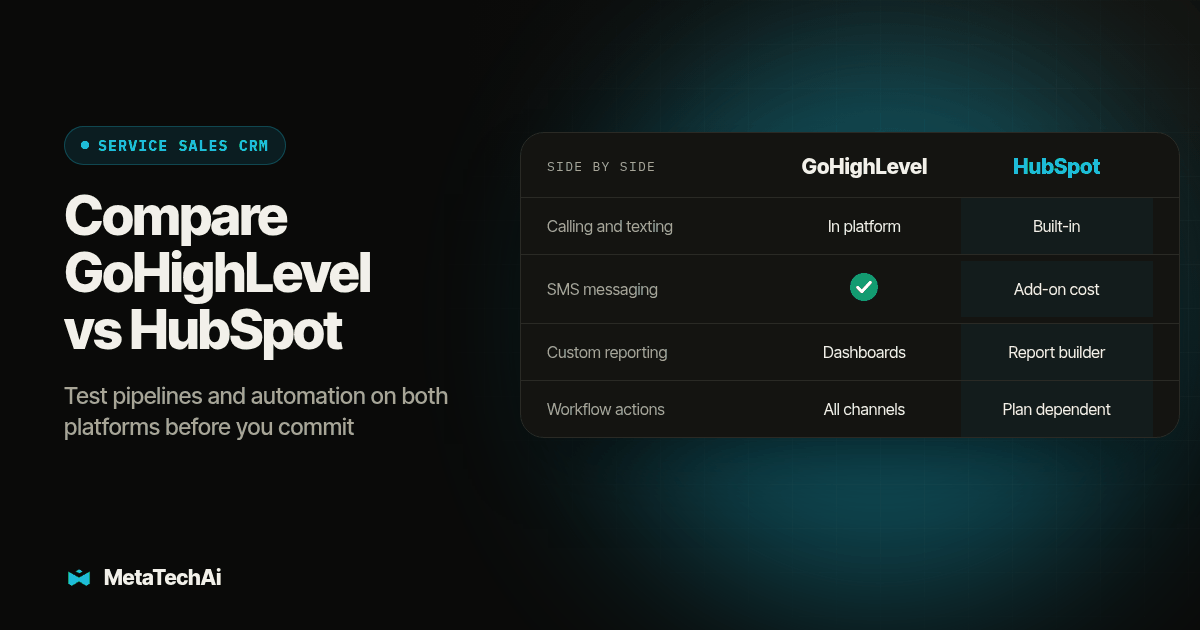
| Calling and texting | Communication tools in the platform; verify setup and usage | Built-in calling; SMS workflow action requires the Marketing SMS Add-On |
| Integrations | Test each required trigger, field and action | Test each required trigger, field and action |
| Automation | Workflow triggers and actions across supported channels | Workflow actions depend on subscription and enabled tools |
| Reporting | Custom dashboards and widgets; verify required data | Custom report builder; verify subscription and data sources |
| Agency operations | Includes tools for managing client accounts | Evaluate your own team's CRM and connected business functions |
| Ongoing owner | Named administrator for workflows, permissions and records | Named administrator for workflows, permissions and records |
That table is a planning comparison, not a guarantee that either platform will do exactly what your workflow needs. Test the specific features your reps will touch every day inside a trial account before you read a feature list as a promise.
How Do GoHighLevel and HubSpot Differ on Pipelines and Follow Up Automation?
Both platforms support pipelines and workflow automation, but the exact route from an incoming lead to a completed contact attempt needs testing. HighLevel's workflow guide describes triggers, actions and execution logs. HubSpot's workflow action reference documents subscription-dependent actions, including SMS through its Marketing SMS Add-On. A rep placing a browser call and a workflow initiating an automated call are different requirements. Test them separately rather than treating a calling feature as proof of both.
Use the same event trace in both accounts: inquiry received, record created or matched, owner assigned, permitted contact attempt made, result logged and next task visible. Capture the event time at every stage. If an integration is involved, include its delivery result in the trace. The test should reveal where work stops and who can repair it, without assuming either platform automatically covers every step.
For a ten person team, the first minute after an inquiry can be a useful test window, not a promised response time. Choose an operating target that matches your staffing, permitted contact methods and opening hours. Then test whether the configured system meets it with controlled records. Include an unanswered call, an after-hours inquiry and a reply that should stop further outreach. The handoff must leave a human rep with a clear next action.
Which Platform Gives a Sales Manager Better Reporting?
HubSpot's custom report builder can combine objects and activity data, subject to subscription access. HighLevel also documents custom dashboards, so it should not be dismissed as limited to basic dashboards. Check feature access in the account you intend to buy. A reporting comparison needs the same data, filters and business question on each side.
Ask what decision the report needs to support. If a manager needs to know which rep has overdue follow up today, test ownership, task status and the date filter. If the question is which campaign produced completed jobs, agree on the attribution definition and the system holding job completion data. A report that counts booked appointments cannot answer a completed-job question. Trace a few sample records through the report before accepting its total as evidence.
Who Ends Up Maintaining Each Platform Once It's Live?
Somebody owns pipeline stages, automation rules, duplicate contact cleanup and permission settings on both platforms. That job does not disappear because the interface looks approachable. List the workflows and connected tools your administrator must support, then check whether another person can diagnose a failed event from the documentation. More tools in one account may reduce switching between apps, but they still create settings, dependencies and change requests that somebody must manage.
A rep who notices a broken automation rule and reports it the same day helps prevent a small problem becoming a lost queue of leads. Name one person, even if it is a part time responsibility, who owns CRM administration before launch. Give that person a weekly check: new leads routed correctly, automations fired as expected, permissions remain appropriate, and duplicate or dead records reviewed. Record configuration changes so a replacement administrator can understand what changed and why.
How Should You Test GoHighLevel vs HubSpot Before You Commit a Ten Person Team?
Run the same evaluation on both platforms before you sign an annual contract for either one. This is an original test procedure for this article, not a claim that a specific client ran it with a measured outcome.
- Write down your five most common sales workflows in plain sentences before opening either trial account. Example: "when a lead replies after hours, a text goes out within one minute and a task appears for the morning rep." If you cannot write the sentence, you are not ready to configure either platform yet.
- Arrange evaluation access to the required features on both platforms at the same time. Confirm that the account includes the workflow and reporting tools you plan to test. A basic account may not represent the proposed production setup, so ask the vendor to identify any evaluation limits before starting.
- Build the same pipeline with the same stage names in both accounts. Do not simplify one platform's pipeline to make the comparison easier; a simplified test tells you nothing about your real workflow.
- Rebuild each of your five workflow sentences as an actual automation in both platforms. Time how long each build takes and note every feature you had to work around.
- Run ten synthetic test leads through each pipeline with a rep who was not involved in the setup. Have that rep try to find the next action without help from whoever configured the system. If they cannot find it in under a minute, the workflow is not ready, regardless of which platform it is built on.
- Pull one report from each platform that answers a real question your sales manager asked last month. If neither platform can answer it without manual spreadsheet work, that is a genuine gap, not a training problem.
- Price out year one and year two at your actual headcount and contact volume on each vendor's current pricing page, not from a blog post, since both platforms change tiers.
Use synthetic contacts and controlled team numbers, with customer sends disabled during rehearsal. Record expected and actual results for every case. These are proposed test quantities and timing targets, not measured customer outcomes.
Copy this checklist into your own notes before you start either trial:
- Five core workflow sentences written down and agreed on by the sales manager
- Same pipeline stage names built in both trial accounts
- Each workflow sentence rebuilt as a live automation in both platforms
- Ten test leads run through each pipeline by a rep who did not build it
- One real reporting question answered from each platform without a spreadsheet
- Current year one and year two pricing pulled from each vendor's own site
- One named administrator assigned before launch, regardless of which platform wins
What Does Switching Platforms Actually Cost in Work?
If your team is already on one platform and considering the other, the switching cost shows up in automation and history, not in the contact export itself. HighLevel's own documentation on exporting contacts to a CSV notes that automation history is excluded from the export and that long notes may be truncated (HighLevel, contact export documentation). That means a contact file moves with you, but the record of what triggered what, and when, generally does not. Treat any CRM migration as a rebuild of your automations in the new system, verified against the same test leads described above, not a simple file transfer.
Where Does an AI Sales Layer Fit on Top of Either Platform?
A CRM selection does not by itself define how your business handles a hot lead when every rep is busy. Before adding an AI agent, check the tools already available in your chosen platform and identify the remaining workflow gap. The added layer should log outcomes, respect contact preferences and hand suitable leads to a rep. We map that workflow and pick one source of truth for the lead record, the same discipline covered in our guide to AI infrastructure for service businesses.
For a GoHighLevel setup, RizzDial's GoHighLevel integration provides a direct connection for its AI calling and texting tools. RizzDial is a MetaTechAi product. Verify the required record updates and handoff behavior in your own account. For a HubSpot setup, scope and test the supported connection before promising that the same workflow will transfer unchanged. Neither an integration listing nor an AI demo proves that your exact routing rule works.
What Do Buyers Ask About GoHighLevel vs HubSpot?
How much does GoHighLevel cost compared to HubSpot?
Compare scoped proposals for your actual users, contact handling, communication usage, required features and support. Include implementation and ongoing administration. Do not assume the base subscription covers every channel or automation shown in a demo, and confirm current terms directly with each vendor before signing.
How long does it take to set up GoHighLevel or HubSpot for a ten person sales team?
There is no universal setup timeline. Plan for pipeline mapping, automation rules, calendar and phone configuration, data cleanup, training and a parallel test run before cutover. Estimate from those tasks and their owners rather than assuming account signup makes either platform ready for ten reps.
Does GoHighLevel integrate with the tools a service business already runs?
GoHighLevel provides communication tools, calendars, funnels and automation, but that does not prove every existing tool connects as required. For either platform, test the specific trigger, fields, action and failure handling you need in an evaluation account. An integration name alone does not establish a complete workflow.
Which platform handles consent tracking and compliance fields better for a regulated service business?
Evaluate both platforms against your documented requirements for consent records, opt out handling, permissions and record history. The CRM choice alone does not establish compliance. Whoever owns administration must configure the required controls and test that outreach stops when the relevant contact preference changes.
What does switching from HubSpot to GoHighLevel, or back, actually cost?
Migration work includes mapping fields, preserving required history, rebuilding workflows, training reps and testing the handoff. A contact export is not a complete copy of an operating CRM. HighLevel documents that automation history is excluded from contact exports and long notes may be truncated. Rehearse the transfer before retiring the old system.
Where Should You Start?
Start with the five workflow sentences from step one of the test procedure above, before you book a single demo call. Write them down with your sales manager, test both platforms against the same sentences, and name an administrator before launch day, not after the first automation breaks. If your team has already sunk weeks into deciding and still cannot agree, our breakdown of whether to build a custom CRM or use GoHighLevel and our guide to what has to be in place in a CRM before an AI sales system can help both walk through the groundwork a ten person team needs regardless of which vendor wins. Once the CRM decision is made, MetaTechAi installs the AI sales layer on top of it, with a guarantee that conversions go up or the client does not pay.