
Which Sales Metrics Should an AI Dashboard Actually Track?
By MetaTechAi ·
A service business's AI dashboard should track metrics that trigger a specific next action: which lead gets called today, which rep gets coached this week, which stage is stalling deals. If a number on your dashboard would not change any of those decisions, it is a vanity metric, no matter how good it looks in a screenshot. Use the seven-question audit below when reviewing your AI infrastructure, so the dashboard connects system activity to decisions your sales team can act on.
What Actually Separates a Vanity Metric From an Outcome Metric?
The test is not whether a number is big or whether it is hard to calculate. The test is whether anyone changes behavior because of it. A public discussion of this buyer problem appears in AIUnpacker's guide to AI metrics for small businesses, which distinguishes tool usage from customer and revenue outcomes. That distinction is useful for reviewing a sales dashboard; it is not evidence that any particular dashboard improves conversions. Treat the audit below as a practical procedure to test with your own records.
Consider a hypothetical service business dashboard. A tile reading "312 AI-qualified leads this month" feels like progress. It tells you nothing about how many of those 312 became booked appointments, how many booked appointments showed up, or how many of those became closed jobs. Each of those downstream numbers is an outcome metric. The lead count by itself is activity, and activity metrics are the ones that make a dashboard look alive while a sales manager is still guessing whether anything is working.
For this audit, connect each measure to a pipeline stage your reps can influence. Booked appointments need an attendance measure beside them, and attended appointments need a closed-job measure. Keep a way to inspect the underlying activity when a result changes. Activity data can explain a problem even when it does not deserve the largest tile on the manager's screen. The distinction is about how you use a number, not whether the number is always useless.
How Do You Audit a Dashboard You Already Have?
A dashboard can grow one tile at a time after someone asks for another number in a meeting. Without a later review, the original question can disappear while the tile remains. Use this seven-step audit to decide what deserves space in the main view.
- Pull a screenshot of the full dashboard and list every tile on it, numbered, before you touch anything. You cannot audit what you have not inventoried, and working from memory can miss tiles that nobody checks anymore.
- Check whether the number underneath each tile is trustworthy first. A metric built on dirty CRM data (duplicate contacts, unlogged stage changes, missing lead-source tags) will mislead you no matter how well-chosen the metric is. If the underlying field is not reliable, fix that before you judge the metric; our CRM pipeline stage evidence checklist covers what counts as a trustworthy stage change.
- For each tile, write down the specific action someone takes differently because of that number. Not a general feeling ("it helps us understand performance") but a specific action: "if this number drops below X, the sales manager pulls that rep's calls for review this week." If you cannot name the action in one sentence, write "none" next to that tile.
- Mark every tile with "none" as a vanity metric candidate. Keep the reason for the flag beside each tile. Do not delete them yet.
- For each vanity candidate, find its nearest outcome metric from the comparison table below, or build a custom one using the same test: does this number point at a specific stage, rep, or lead segment where someone can intervene this week.
- Rank the surviving outcome metrics by how often someone actually needs to act on them, and put the ones that change a decision daily or weekly at the top of the dashboard. Metrics that only matter at a monthly or quarterly review belong lower down, not gone, just not competing for the manager's attention every morning.
- Re-run this audit every quarter, because new tiles creep back in the same way the old ones did: someone asks a one-off question in a meeting, a developer adds a tile to answer it, and it never gets removed once the question is answered.
Which Common Dashboard Metrics Are Vanity Numbers, and What Should Replace Them?
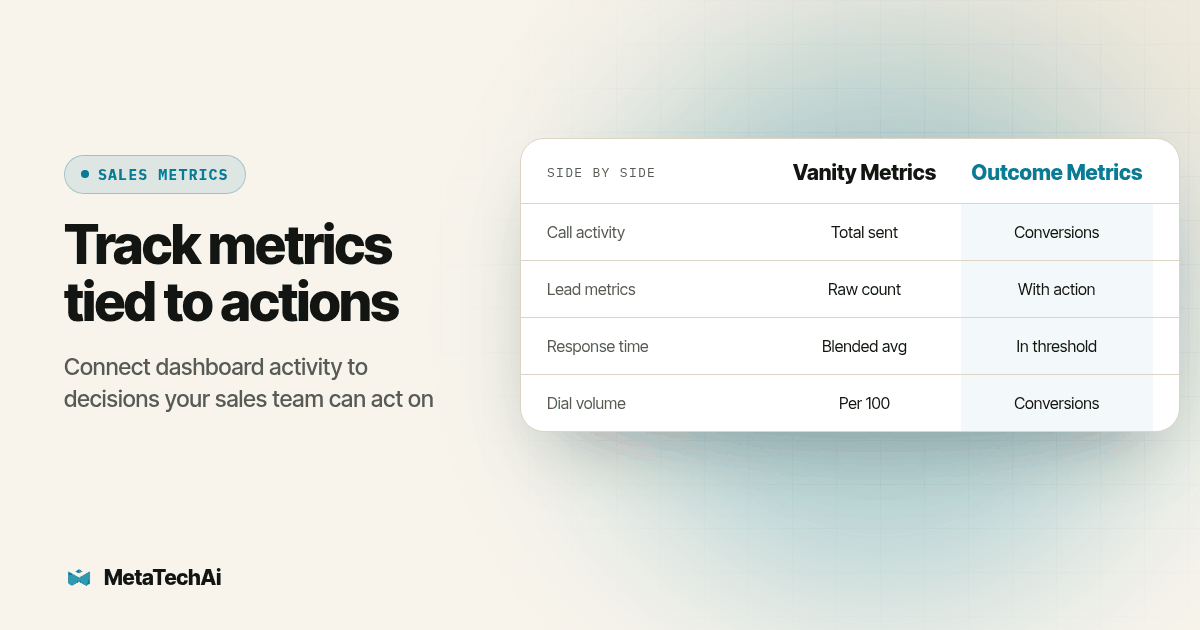
Run this table against your own dashboard during step 5 of the audit above. The left column lists activity measures to challenge; the right column offers measures to test instead, and why that replacement passes the "does someone act on this" test.
| Vanity metric (what it measures) | Why it fails the test | Outcome metric to replace it |
|---|---|---|
| Total AI calls or texts sent | Counts effort, not whether any of it converted | Conversion rate from AI-touched lead to booked appointment |
| Number of automations or workflows built | Describes build activity, not business impact | Hours reclaimed per rep per week, redeployed to selling |
| Dashboard logins or tool usage hours | Measures adoption of the tool, not results from it | Pipeline value advancing per week, by stage |
| Raw lead count generated this month | A large top-of-funnel number hides a weak middle or bottom | Leads advancing to the next stage with a dated next action logged |
| AI lead score shown alone | A score with no outcome attached cannot be checked | Show rate and close rate by lead score band, reviewed monthly |
| Average response time (all leads blended) | Blends fast and slow responses into a number nobody can act on | Percentage of leads contacted inside your speed-to-lead threshold |
| Call or dial volume | Volume without an outcome filter rewards busywork over results | Conversions per 100 dials, booked meetings per rep per week |
A forecast built on blended averages has the same failure mode as a blended response-time metric: it looks precise and hides which specific deals are driving the number up or down. We cover that version of the same problem in AI sales forecast versus rep gut feeling, which is the forecasting-side mirror of this dashboard audit.
How Do You Know an Outcome Metric Is Actually Reliable?
Picking the right metric name does not help if the number underneath it is wrong. Before you trust any outcome metric enough to put it at the top of a dashboard, check three things against your own CRM: the stage definitions the metric depends on have written evidence requirements (not just a rep's judgment call), the lead source field was captured at first contact rather than guessed later, and the metric survives a spot check where you manually trace five records from raw lead to final outcome and the dashboard number matches what you find by hand.
That last check matters more than most teams expect. For a hypothetical failure case, imagine a conversion tile counting reopened old quotes as new conversions. A manual trace would reveal that the same opportunity is receiving credit twice. The calculation needs an explicit rule for reopened records before the manager can trust the result. We walk through exactly this kind of verification in how to prove an AI sales system raised conversions, which is the companion piece to this audit: that article covers proving the number is real, this one covers choosing which number to prove in the first place.
How Should You Define the Numbers Before Comparing Results?
Give every outcome tile a short definition that a second person can reproduce. For appointment conversion, divide unique eligible leads with a qualifying booking by all unique eligible leads in the same intake group. Write down which leads qualify, how duplicates are merged, the observation window and whether rescheduled appointments count once. Show the underlying counts beside the rate. A rate without a denominator makes a small group look as substantial as a large one.
For show rate, use appointments due to occur in the review window and document how cancellations and reschedules are treated. For close rate, decide whether the denominator is qualified opportunities, attended appointments or all leads. Those answer different questions. Do not compare two reps until their tiles use the same definition and comparable lead sources. Otherwise a change in the mix of work can look like a change in performance.
For speed to lead, record the inquiry timestamp and define the response that stops the clock. A delivery receipt, automated acknowledgment, attempted call and useful sales response are different events. Keep unanswered leads visible rather than dropping them from the average. Set the response threshold from your coverage plan, then inspect the records outside it to decide whether routing, staffing or follow-up needs attention.
For pipeline advancement, require evidence of movement rather than an automatic stage edit alone. Preserve the prior stage, new stage, event time and opportunity identifier. For time reclaimed, compare the same task before and after automation and include review and correction work. Saved time becomes a sales-capacity measure only when you can explain what the rep did with it.
Finally, separate AI involvement from AI impact. A lead touched by automation and later won is an observed result, not proof that automation caused the win. Use comparable groups or an agreed baseline when evaluating improvement, and record other changes such as lead sources, staffing and offers. MetaTechAi installs AI sales and marketing systems for service businesses with sales teams, with a conversions-up-or-you-don't-pay guarantee. Agree on the conversion definition and measurement terms during scoping so the dashboard supports that discussion.
What Does This Look Like on an AI Voice or Calling Dashboard Specifically?
The same vanity trap shows up in AI calling dashboards, just with call-specific activity numbers standing in for the generic ones above: total calls dialed, total minutes talked, total voicemails left. None of those tell a sales manager whether the calling program is working. Our sister post on measuring AI dialer ROI breaks the same audit down for outbound calling specifically: cost per lead against a loaded rep cost, and the revenue impact of calls that actually convert, rather than the raw dial count. If your AI dashboard blends calling activity with sales outcomes in one view, apply the same seven-step audit to the calling tiles before you trust any number that starts with "total."
What Should a Service Business Sales Manager Do With This Today?
Pull up your current dashboard right now and run steps 1 through 4 of the audit on just the top five tiles, the ones you look at most often. Mark any tile where you cannot name a specific action tied to the number. Those are your first candidates to swap using the comparison table above. Start by checking whether existing CRM fields can support the dashboard view your team opens every morning.
If the audit surfaces a deeper problem, stage definitions nobody agrees on, lead source data that was never captured consistently, or a CRM that cannot calculate the outcome metrics you actually need, that is a data readiness problem, not a dashboard design problem, and it is worth fixing before you add a single new tile. That is the kind of groundwork we handle as part of AI infrastructure planning: mapping which of your existing systems can already produce a trustworthy outcome metric, and which ones need fixing first. A dashboard full of the right numbers, built on data the team has already verified, is worth more to a sales manager than a dashboard full of numbers that merely look busy.
What Do Service Business Buyers Ask About AI Dashboard Metrics?
How long does it take to turn a vanity-metric dashboard into one that tracks outcomes?
There is no fixed schedule without checking the underlying records. Start with a working session involving the dashboard owner and the sales manager. Inventory the tiles, agree on the decisions they should support, and list any missing fields or unreliable timestamps. Then estimate the rebuild from those gaps. A change to a chart can be small; reconstructing historical stage evidence or repairing inconsistent lead sources requires separate work. Ask for a scoped plan with a data check before accepting a delivery date.
Does fixing dashboard metrics mean ripping out our CRM reporting?
No. Start with the reporting tool you already use and verify whether it can calculate the chosen metrics from your records. You may only need to change which numbers get a prominent tile and which move to a secondary activity log. Some metrics require additional fields, retained history, or an export to a separate report. Have the dashboard owner demonstrate each calculation with actual records before deciding whether any new tooling is necessary.
What does it cost to rebuild a sales dashboard around outcome metrics?
It depends on how much of your pipeline stage and lead source data is already trustworthy, which is exactly what the CRM readiness check in step 2 of the audit above is for. A business with clean stage evidence and consistent lead-source tagging can usually repoint an existing dashboard without new software. A business whose CRM data is a mess needs to fix that first, and that work (not the dashboard itself) is where the real cost sits. Talk to our team about your specific setup through our AI infrastructure planning work before you budget for a rebuild.
If we switch CRM or AI vendor, do we lose our dashboard metric history?
History can become unavailable if it exists only in a vendor dashboard and you have no usable export or retained records. Before switching, export the underlying events, timestamps, record identifiers and metric definitions, then test whether you can reproduce a historical result. Keeping those inputs in systems you control makes reconstruction easier. Portability and usefulness are separate tests: a valuable outcome metric can still be difficult to migrate if its source data was never retained.