
Automated Sales Funnel for a Service Business
By MetaTechAi ·
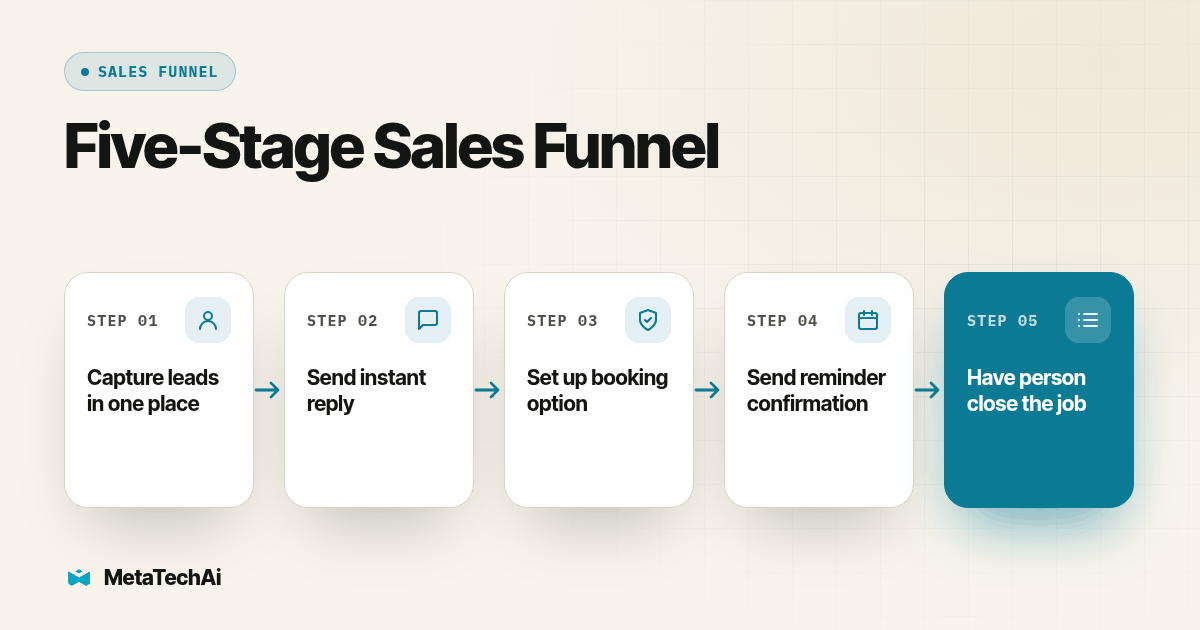
An automated sales funnel for a service business has five stages: intake that keeps the lead source, a prompt acknowledgment of the request, a booking step that puts a real slot on a calendar, a reminder sequence that protects the booking, and a human close that actually signs the job. Automation carries the first four; a person closes the fifth.
Consider a service business where leads come in from several places and nobody can say what happens to them after intake. Mapping the funnel makes that missing handoff visible. The answer isn't a single tool. It's five stages in a fixed order, each one handing a lead to the next with less lost in the handoff than the stage before it. Below is the order we actually build in, what each stage automates, what still needs a person, and a test you can run this week to see where your own funnel breaks.
What are the five stages of an automated sales funnel for a service business?
In order, because each stage depends on the one before it working correctly:
- Intake. An ad click, a form fill or a call comes in, and the lead's source, contact details and the exact thing they asked about get written to one record, not scattered across an ad platform, an inbox and a sticky note.
- Instant follow-up. An automated reply goes out within minutes, acknowledging the specific request, not a generic "thanks for reaching out."
- Booking. The reply moves toward a real calendar slot, either by letting the lead self-book or by an AI or human qualifying the request first and then booking it.
- Reminders. The booked slot gets protected with confirmation and reminder messages timed to the appointment, cutting down on the slot going unused.
- Human close. A person shows up, runs the visit or the call, and closes the job. Nothing before this stage is designed to replace that conversation.
Funnel automation platforms describe stages in roughly this shape, with intake, nurture and booking treated as distinct steps a business should build deliberately rather than string together after the fact (Aloware, sales funnel automation guide). For a service business with an existing sales team, we recommend checking the order dependency: build stage two before stage three, because a booking automation that fires off an unqualified or unacknowledged lead just moves the same confusion one step down the pipe.
How does intake capture a lead without losing the source?
Intake has one job: get every lead into one record, with its source attached, before anything else happens to it. That sounds obvious until you watch it fail. A lead fills out a form, the form tool emails someone, that person forwards it to a rep, and by the third hop the ad campaign that generated the lead is gone from the record entirely. Six months later nobody can tell which campaign is actually producing booked jobs.
The fix is a single trigger per intake channel, pointed at one CRM record type. A web form submission, a call that doesn't connect to a rep, and an ad platform's native lead form should all write to the same opportunity object, tagged with source, campaign and the specific service or question the lead mentioned. GoHighLevel's workflow actions documentation lists the pieces this needs: contact-field updates, contact tags and opportunity actions to carry source data forward (HighLevel workflow actions, complete list). If your intake runs through more than one platform, the only thing that matters is that every one of them lands in the same place, not that any single tool is fancier than the others.
Treat intake as a foundation you can inspect. Before adding another channel, submit a labeled test inquiry and check the original source, service request and assigned owner together. A reminder sequence or follow-up trigger is only as useful as the record it reads.
What should the instant follow-up actually say and do?
The instant follow-up is not a form confirmation. "We received your message" tells a lead nothing and gives them no reason to wait for a real reply. A follow-up worth automating repeats back the specific thing they asked about, sets an expectation for what happens next, and gives them a way to act immediately if they don't want to wait.
Build it as one trigger off the intake event: a text or email that fires within minutes, worded as a real acknowledgment, paired with a task for a human so the automation and the person working the lead are reading off the same record. If the lead asked about a specific service, name it in the reply. If they asked a yes-or-no question your business can answer instantly, like whether you serve their zip code, answer it in the same message instead of making them wait for stage three.
This stage is deliberately narrow. It answers "did anyone get my message," not "how fast will a person call me back." We've written separately about setting a realistic target for that second question, because the instant automated reply and the human response-time standard behind it are two different things that get confused constantly: see our guide to how fast a sales team should answer an inbound lead for the SLA side of this. This article stays on the funnel architecture; that one covers the clock.
How does automated booking turn a reply into a calendar slot?
Booking is where the funnel either produces a real appointment or produces another step a lead has to take on faith. Two shapes work, depending on what you're selling. A self-book link works when the request is simple enough that a lead can pick their own slot without anyone qualifying them first, think a routine inspection or a standard consultation. A qualify-then-book flow works when the request needs a quick check first, the right service area, the right crew, the right equipment, before a slot goes on the calendar.
A mortgage-company client raised a concrete version of this question in an October 2 call: their calendar could not capture an address or route field reps by area. That is a routing requirement, not evidence that any particular fix has already worked. A proposed solution is an address field in the intake form and a booking rule that checks territory before offering a slot. Test whether the calendar supports those rules; if it does not, plan a routing layer and keep exceptions assigned to a person.
Whichever shape fits your business, the booking trigger needs the same three things: a field that captures whatever the routing decision depends on, a rule that uses that field before a slot is offered, and a confirmation that writes back to the same CRM record from stage one. If booking happens on a separate tool from your CRM, that write-back step is the one most teams forget to test, and it's the one that breaks silently, the slot gets booked, the calendar looks right, and the CRM record never updates.
What do automated reminders need to do before the human close?
A booked slot is not a kept slot. Reminders exist to close that gap, and they work better when they do more than restate the time. A reminder that repeats the appointment window, location or format, and a plain next step gives the customer details they can check and a way to report a scheduling problem.
Confirmation by text instead of a phone call fits this stage particularly well, because it gives the lead something to glance at and act on instead of something they have to answer live. We cover the specific wording and timing for this in Beam's guide to confirming appointments by text instead of calling, which goes into what the confirmation message itself should say and how to log a reply as confirmed, rescheduled or no-reply. For a service business, a reminder sequence can include an earlier confirmation and a later reminder, with timing agreed for your appointment type, with each message logging its own status back to the CRM record so stage five starts with an accurate picture of who actually plans to show.
Treat a no-reply on the final reminder as its own trigger, not silence. Give the owner a task to review an unconfirmed appointment. Offer a way to reschedule, but do not cancel a valid booking just because its reminder went unanswered.
Why does the funnel still end with a human, not AI?
Every stage before this one exists to get a qualified, reminded, reachable lead in front of a person at the right time. None of it is built to replace that person. The close is where price gets discussed, objections get handled in real time, and a specific service agreement gets signed, and that's a conversation, not a sequence.
This is also where the guarantee behind MetaTechAi's work actually applies. We agree with a business on the conversion number we're trying to move, install the four automated stages to get leads to that closing conversation in better shape than they'd otherwise arrive in, and the guarantee stands on whether that number moves: conversions go up, or the client doesn't pay for the work. The automation's job is to make sure the right leads reach the close stage reachable, informed and on the calendar. The close itself stays a person's job, every time.
Where does the funnel actually leak, stage by stage?
| Stage | What automation carries | What a person still has to check |
|---|---|---|
| Intake | Writing every lead, with source, to one record | Confirming every channel actually lands in that record, not just the ones someone remembered to test |
| Instant follow-up | Sending an acknowledgment within minutes | Wording it specifically enough that it reads as real, not generic |
| Booking | Offering or assigning a calendar slot | Routing rules for territory, service area or crew, and catching requests the rule doesn't fit |
| Reminders | Confirming and re-confirming the appointment | Treating a no-reply as a trigger to act on, not a sign everything's fine |
| Human close | Nothing. This stage is not automated. | Running the actual conversation and closing the job |
How do you test whether your funnel actually works end to end?
Run this before you trust any stage of the funnel with real leads:
- Submit a test lead through every intake channel, one at a time, logging the time and the exact wording you used in each one.
- Time the instant follow-up for each channel. Confirm it names the specific thing the test lead asked about, not a generic acknowledgment.
- Push the test lead to booking and confirm the calendar only offers slots that fit the routing rule you set, service area, crew or whatever your business depends on.
- Let the reminder sequence run its full course on the booked test slot, confirming each reminder fires on schedule and logs its status back to the CRM record.
- Check the CRM record at the end, source, every message sent, every reminder status and the final booking, all on one record with nothing missing or duplicated.
Passing one test establishes that the tested path worked once. Repeat with duplicate submissions, missing addresses, unavailable slots, cancellations and opted-out contacts. Check that retries do not create duplicate messages or appointments. Record failures with an owner and retest the affected path before expanding to real leads. A small monitored rollout is still necessary because a successful test does not establish reliability at volume.
What goes on the stage-by-stage audit checklist?
Paste this into a doc and fill in one row per stage before you call any part of the funnel done:
| Field | What to write down |
|---|---|
| Stage | Intake, instant follow-up, booking, reminders or human close |
| Trigger | The exact event that starts this stage |
| Tool | What sends, books or logs this stage today |
| Writes back to CRM? | Yes or no, and what field it updates |
| Last tested | Date you last ran a real or test lead through it |
What do service sales teams ask about building this funnel?
What does an automated sales funnel cost to set up?
We don't publish a flat rate because the build depends on how many tools you already have and how many of these five stages already exist in some form. We scope it on a call, agree on the conversion number we're trying to move, and work under the guarantee: if that number doesn't move, you don't pay for the work.
How long does it take to go from nothing to a working funnel?
Timing depends on CRM event reliability, routing complexity, approvals and the integrations needed. Scope those dependencies first, then agree a launch plan with a test window. Broken triggers, missing stage definitions or permission gaps must be resolved before automation runs on real leads.
Does this replace our CRM, or sit on top of it?
The proposed funnel uses your existing CRM as its record of leads, stages and timestamps. First verify that calling, texting and booking tools can read and update the required fields. Compatibility depends on your configuration; test the connections before deciding whether any tool needs replacing.
The FTC telemarketing guidance explains calling-time and Do Not Call obligations for covered calls. Review the requirements that apply to your actual outreach before enabling it.
Does an automated funnel create TCPA or consent problems?
It can. Have the person responsible for compliance confirm the consent, contact-time and opt-out requirements for each channel and campaign. Check permission and suppression status before each outbound action, and route uncertain records to a person. This checklist does not establish that a campaign complies with the law.
What happens to our current funnel if we switch to this?
Nothing gets ripped out on day one. We map what you already have stage by stage, keep the pieces that work, and replace or connect the pieces that don't, so you're not starting from a blank CRM in the middle of a live pipeline.
What should you build or fix first?
Agree the conversion definition, baseline, measurement window and covered work in writing. MetaTechAi's standing guarantee is that conversions go up or you do not pay; the engagement agreement defines its coverage and remedy. Track completed appointments and signed jobs separately so a booking increase is not mistaken for a closing improvement.
Before any of these five stages goes live on real leads, check your CRM for the readiness gaps that break automated funnels, duplicate records, missing stage definitions and unclear ownership all show up here first, and they'll break stages two through five quietly if they're not fixed in stage one. Once the foundation is solid, our managed AI services team builds, tests and tunes all five stages for you under the standing guarantee that conversions go up or you don't pay for the work.