
Build a Custom AI Agent or Buy Off the Shelf?
By MetaTechAi ·
Buy an off the shelf tool when it passes tests for your standard sales workflow. Build a custom AI agent only for requirements no suitable tool can meet, with a named owner for maintenance after launch. For a service business, a practical starting point is to buy the common workflow and build only the specific layer it lacks.
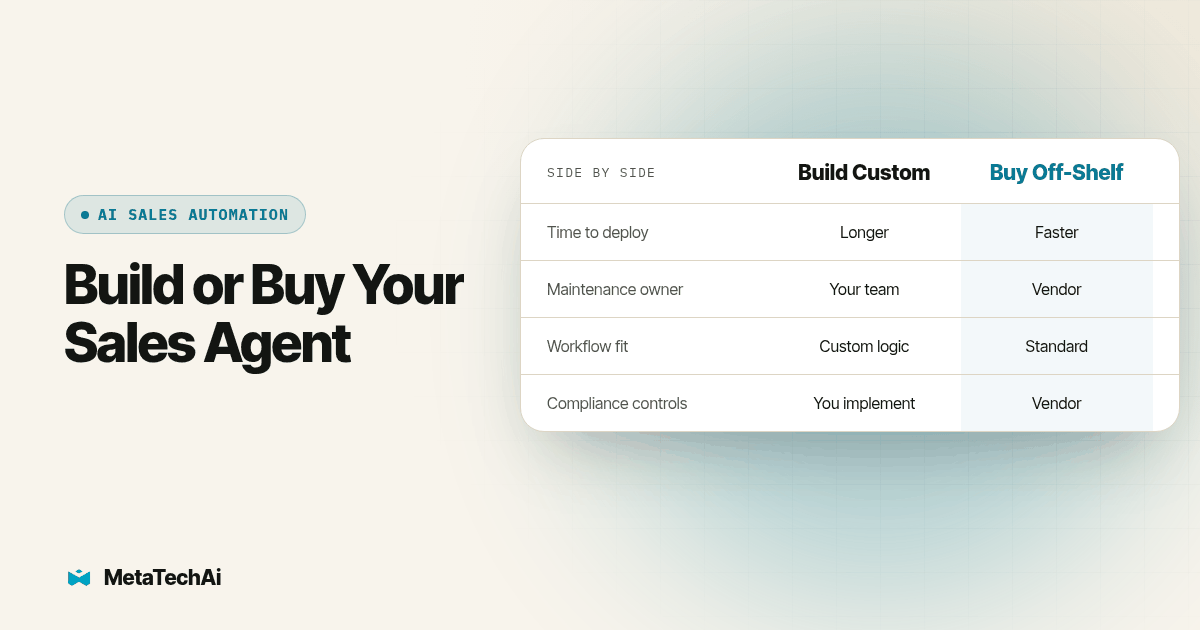
A service business asking whether to build a custom AI agent or buy an off the shelf tool is really asking one question: is this workflow standard enough that someone else has already solved it well, or is it specific enough to us that no vendor's tool will fit? MetaTechAi installs AI sales and marketing systems for service businesses with sales teams. Use a short, documented test to turn this choice into evidence your sales manager and technical owner can review together.
Should a service business build a custom AI agent or buy an off the shelf tool?
The short answer: buy first, build only the piece that has to be proprietary. Lead qualification, follow-up messaging, appointment booking and basic call handling are candidates for packaged tools. Evaluate whether a candidate already supports the triggers, records and human handoffs you need. Buying is a reasonable starting point when the demonstrated fit is strong and you can inspect the controls, support responsibilities and exit process.
Building makes sense in a narrower set of cases: your pricing logic is specific to your business and competitors would pay to see it, your data sits under a compliance requirement that off the shelf tools don't satisfy, or the workflow touches three or four systems in a sequence no packaged tool was built to handle. Even then, most businesses only need to build one connector or one decision step, not the entire agent from scratch.
How do a custom AI agent and an off the shelf tool actually compare?
| What you're deciding | Custom AI agent (build) | Off the shelf tool (buy) |
|---|---|---|
| Time to first live use | Estimate scoping, development, integration and acceptance testing | Estimate configuration, integration and acceptance testing |
| Who absorbs new edge cases | Your technical owner investigates and changes the implementation | Vendor handles product defects; your team still checks configuration and escalation |
| Ongoing maintenance | Assign code, hosting, dependency and monitoring ownership | Check vendor support scope and ownership of your integrations |
| Fit to a proprietary workflow | Can implement the required logic if the scope and resources support it | Must demonstrate the needed behavior or expose an integration path |
| Compliance and security controls | Your team must implement or configure and verify the required controls | Verify documented controls in the actual plan and configuration |
| Data portability if you switch later | Confirm ownership, export access and dependencies in the build agreement | Test export and CRM write-back, including history and attachments |
| Risk of the project getting shelved | Unclear value or unmaintainable scope can stop the project | Poor workflow fit or unresolved dependencies can also stop a purchased implementation |
Gartner forecast that over 40% of agentic AI projects would be canceled by the end of 2027 because of rising costs, unclear value or inadequate risk controls (Gartner, June 2025). This is a forecast across agentic projects, not an observed failure rate for service businesses or evidence that buying has a lower cancellation rate than building. Use it as a reason to define value and ownership for either path.
Why are more businesses choosing to build their own AI tools in 2026?
McKinsey's 2026 State of AI survey reports that 32 percent of respondents said their organizations had decided against buying at least one software product or feature because they could build it internally with agentic coding tools (McKinsey, State of AI 2026). That describes a purchase decision across surveyed organizations, not a success rate for custom sales agents or a finding specific to small service businesses.
Our interpretation for this decision is straightforward: the ability to produce a prototype should start an evaluation, not finish it. A prototype still needs tests against realistic records, an accountable operator, approved access and a plan for failures. Compare those obligations with the configuration and integration work a packaged product would require before treating either path as ready for customers.
What happens when a service business tries to build everything in house?
Consider a hypothetical service team with two people building a replacement for a packaged tool. The demo can draft a reply, but it cannot reliably match a returning customer to an existing quote or route an unusual request to the correct rep. The build decision is now about those missing behaviors and the team's ability to support them, not the quality of the demo.
The same problem can appear after buying: a product may handle a clean example while failing on the business's real exceptions. Compare both options against identical cases. We've written about one narrower version of this decision, building a CRM instead of using GoHighLevel. For a sales agent, add the systems it can act on and the actions that require human approval to that comparison.
How do we actually decide, step by step, before committing either way?
Run this test before you write a line of code or sign a contract. Time-box the initial evaluation, then allow enough time to resolve failed cases before launch.
- Write down the exact workflow you're trying to automate, start to finish: what triggers it, what systems it touches, and what a successful outcome looks like.
- List every system the workflow has to read from or write to. Your CRM, calendar, quoting tool, payment processor, anything that holds data the agent needs.
- Search for two or three off the shelf tools built for this specific workflow, not a generic AI platform, and check whether each one has a native integration to every system from step 2.
- Score each candidate tool against your actual workflow, not its marketing page: does it handle your specific triggers, your specific exceptions, your specific handoff to a human?
- Identify the one piece, if any, that no candidate handles, whether that's a pricing rule, a compliance requirement, or a sequence across systems nobody builds for.
- Decide whether that one piece is worth building on its own, as a thin layer that sits on top of or beside the off the shelf tool, rather than replacing the whole workflow.
- Set a decision date, usually two to four weeks out, where you commit to the off the shelf tool, the thin custom layer, or a full build, and stop re-litigating it after that date.
- If you choose to build anything, assign one owner who is responsible for maintaining it after launch, not just shipping it, before the first real lead touches it.
Step 5 should produce a specific requirement with evidence attached. A failed booking test, an unsupported field or an approval that cannot be enforced is actionable. A general feeling that the product does not fit is not enough to justify replacing the workflow.
Record the comparison in a scorecard with candidate names down the side and requirements across the top. Mark each cell yes, partial or no, and attach a test result. A partial answer needs a named workaround, an owner and a repeatable check before it can count as a fit.
For a hypothetical appointment workflow, use the same test records in each candidate: a new inquiry, a returning customer, a missing service address, an unavailable appointment and a request that needs a manager. Record the expected outcome before running the case. Keep outbound actions disabled or directed to test contacts so evaluation messages cannot reach customers.
Then repeat one submission and interrupt one connection. Check that the repeated event does not create a second appointment and that a failed write does not silently advance the CRM stage. Ask the operator to find the failure, pause the workflow and hand the record to a person. These are proposed acceptance checks, not a claim that any product already passes them.
Set pass conditions around the business outcome: the correct customer record, the permitted next action, a clear human owner and a traceable result. Keep the evidence from both the successful run and the failed case. If a requirement remains unresolved, state whether it blocks launch or can safely stay manual while the rest of the workflow operates.
What's on our build-vs-buy checklist?
Run through this before you commit to either path:
- The exact workflow, trigger, systems touched and success outcome is written down, not just described verbally.
- Two or three off the shelf tools built for this specific workflow have been evaluated against the real requirements, not just their marketing pages.
- Every system the workflow touches has a confirmed, maintained integration path, native or through an API, for each candidate tool.
- The one piece, if any, that no candidate tool handles has been named specifically, not just felt generally.
- Someone has been assigned to maintain anything you build, by name, before the first real lead reaches it.
- A decision date is set, two to four weeks out, after which the team commits instead of continuing to evaluate.
- Data portability has been checked: if you buy, does the tool write back to your CRM as the system of record, or does it hold your data in its own database?
What's the hybrid rule for deciding build vs buy?
Buy the standard, common parts of the workflow, the pieces that thousands of other service businesses already run the same way: follow-up messaging, scheduling, basic qualification. Build only the proprietary slice, the pricing logic, the compliance handling, or the cross-system sequence that's genuinely specific to your business and that no vendor built for.
That split can limit the scope your team maintains, provided you design a fallback. If the custom connector stops working, hold the affected record for a person instead of allowing the packaged tool to act on incomplete data. A hybrid system still needs monitoring at the boundary between its parts; the split alone does not make failures harmless.
How does this connect to AI infrastructure and managed services?
Deciding build versus buy is only one part of the job; someone still has to map the workflow, score the candidates and maintain whatever gets built. Our AI infrastructure page walks through how we map a specific sales workflow against the systems it touches before recommending a build-or-buy answer for any single piece of it. Managed services covers scoping ongoing operation, monitoring and tuning alongside the integration work. MetaTechAi's standing guarantee is that conversions go up or you don't pay. Agree on the conversion measure, baseline, measurement window, covered work and remedy in writing; your team still supplies current business rules and owns sensitive decisions.
For a narrower look at this same question applied specifically to CRM software, see our guide on building your own CRM versus using GoHighLevel, which walks through the identical build-vs-buy logic for one system instead of a full sales agent.
The same decision shows up outside of AI agents too, in the choice between hiring a consultant and hiring an agency to do the work. AI Guy's comparison of an AI consultant versus an AI automation agency covers that adjacent decision for small business owners weighing who should actually do the building.
What do service businesses ask about build versus buy?
Is building a custom AI agent always more expensive than buying one?
Not necessarily. Compare the same scope over the same planning period: configuration or development, integrations, hosting, usage, security review, training, support and eventual migration. A custom build adds responsibilities your team must staff or contract for. A purchased tool can still need substantial integration work. Ask for a written breakdown and a maintenance owner before deciding which option costs less for your workflow.
How long does it take to stand up a custom AI agent versus an off the shelf tool?
Timing depends on the workflow, data readiness, integration access and acceptance tests. A packaged tool can reduce development work when its existing functions fit, but configuration and testing still take time. A custom agent needs estimates for its missing capabilities as well as those shared tasks. Set milestones for a tested workflow and a monitored rollout instead of assuming a fixed number of days or months.
What should we check for integrations before deciding build or buy?
List every system the agent has to read from or write to, your CRM, calendar, quoting tool, payment processor, and check whether the off the shelf tool has a native, maintained integration to each one. If it needs a workaround for your most important system, that gap either rules the tool out or becomes the reason to build just that one connector instead of the whole agent.
What does it cost us to switch later if we buy the wrong tool?
Switching cost depends on where your data and workflow rules live, and what you can export. Writing activity back to your CRM can reduce migration work, but you may still need to recreate prompts, permissions, mappings and reporting. Test an export that includes history and attachments, and document how another tool would resume work on an active lead before signing an agreement.
Does an off the shelf AI tool meet the same compliance bar as something we build?
Neither option meets your requirements automatically. For a purchased tool, review documented data handling, access controls, logs, retention and the responsibilities left to your team. For a custom build, identify which controls come from underlying services and which you must implement and test. Evaluate both against the same written requirements with the person responsible for security and compliance in your business.