
Why Won't My Sales Reps Follow Up With Leads?
By MetaTechAi ·
Follow-up can fail when it lives in a rep's memory instead of in the CRM. Fix it by firing an automatic task the moment a lead enters the pipeline, adding an AI nudge when a step goes overdue, and giving the manager a daily report of leads nobody has touched. None of that requires asking anyone to try harder.
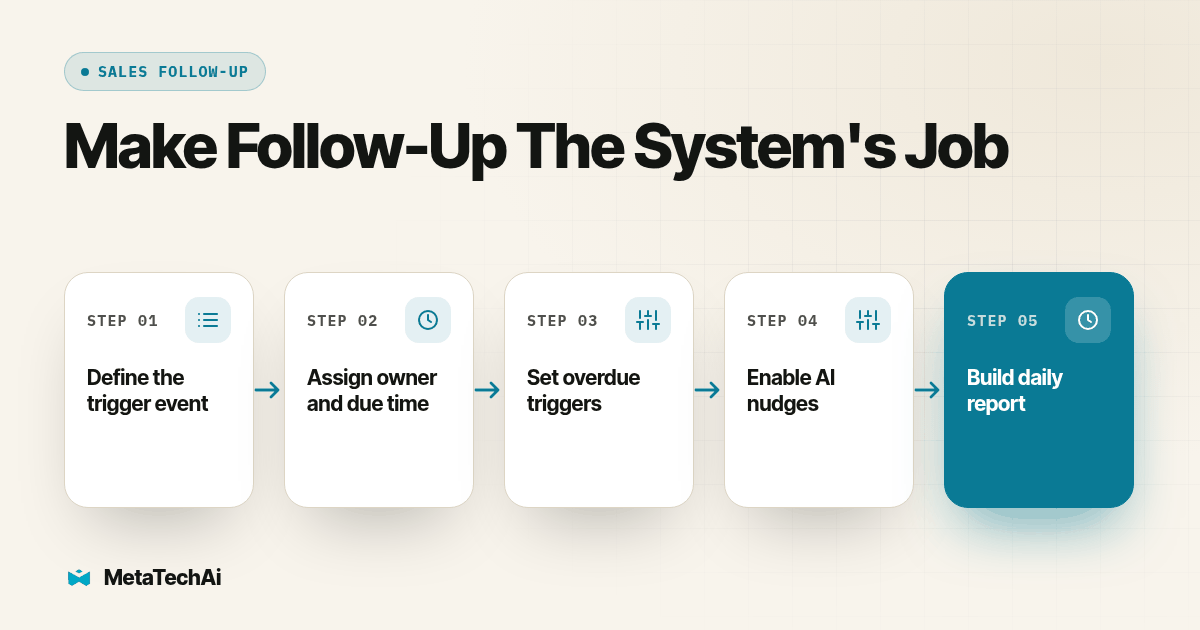
The buyer question supplied for this guide was direct: "My reps will not follow up for four or five days like I ask." That is demand for a practical management fix, not proof that every missed follow-up has the same cause. Start by checking whether tasks, owners and overdue work are visible before deciding whether the gap is workload, missing records or individual performance.
Workflow: New lead enters the CRM. A task gets an owner and due time. An overdue task triggers a targeted reminder. An unresolved task appears on the manager's daily report. Each transition should leave a record that someone can inspect.
Why Do Reps Stop Following Up Even When You Tell Them To?
Reps are not lazy as a rule. They are busy, and busy people default to whatever is loudest in front of them, which is almost never a lead that came in three days ago and has gone quiet. A ringing phone, a walk-in, an angry email: those win every time against a task that exists only in someone's memory or on a sticky note that fell off the monitor.
Telling a rep to follow up more consistently is asking them to out-remember their own inbox, forever, with no backstop if they slip for a day. People slip. Historical research published in 2011 found that companies were often responding too slowly to online inquiries (Oldroyd, McElheran and Elkington, Harvard Business Review research on online sales leads). That finding concerns initial response. It does not establish a universal deadline for later follow-up; use your own buyer commitments and CRM history to set those windows.
What Happens When Follow-Up Depends on a Rep Remembering?
Three things happen, in a predictable order. First, the leads that get worked are the ones the rep happens to think of, not the ones actually next in priority. Second, the manager finds out about a missed lead only when it surfaces on its own, usually when the customer buys from a competitor instead. Third, every conversation about the problem turns into a conversation about the rep's character, because there is no record of what the system itself did or did not do.
How Do You Make Follow-Up the System's Job Instead of a Habit?
Here is a proposed build order for your team. Each step produces something concrete, not a new policy to announce in a meeting.
- Pick the one event that should always create a task. For most service businesses that is "new lead enters the CRM," full stop, not "new lead that looks promising." If the event is ambiguous, the task will not fire reliably and you are back to a habit.
- Set the task's owner and due time at creation, not later. The task should assign itself to the lead's existing owner, by territory, round robin or whatever rule you already use, and carry a due time measured in hours, not days. A task due "sometime this week" is not a task.
- Define what "overdue" means in writing before you automate anything. Pick a number: a scheduled later-touch task might become overdue after its agreed business-hours window. Set a separate first-response target based on coverage and buyer expectations. A second-touch task might get a longer window. Whatever you choose, make it a specific number everyone can see, not a feeling.
- Wire the overdue trigger to an AI nudge, not a blast email to the whole team. The nudge should go to the one rep who owns the task, name the specific lead, and say what is overdue. A generic "don't forget to follow up!" message gets ignored within a week.
- Build the daily untouched-leads report before you build anything fancier. This is the piece that matters most, and most businesses skip it to go build nudges first. The report should list every lead with no logged action past its due time, sorted oldest first, and nothing else. No rankings, no commentary.
- Give the manager a five-minute daily habit around that report, not the reps. The manager opens it once a day, confirms each item either gets worked immediately or gets a documented hold reason, and closes the loop. That is the one human habit the whole system needs, replacing every "remember to check on the team" habit you ran before.
- Review the overdue-time numbers monthly and adjust them. If leads are routinely overdue the moment the clock starts, your window is too tight, and a window that constantly fires gets ignored like any alarm that never stops. If the report stays empty for weeks, test the trigger and report filters before deciding whether the team is keeping up or the window needs changing.
What Should an Automatic Follow-Up Task Actually Trigger On?
Pick triggers that match events your CRM already records reliably; a trigger tied to something nobody logs consistently will silently stop firing. Candidate triggers to test include: a new lead entering any pipeline with no prior contact logged, a scheduled follow-up date arriving with no outcome recorded, a lead going silent for a set number of days, and a quote sent with no customer response by its stated decision date.
How Does an AI Nudge Work Without Turning Into Spam?
The nudge only earns its place if it tells the rep something they could not get faster another way: which lead, how long it has been overdue, and the one next action to take. A message that just says "you have overdue tasks" sends the rep hunting through the CRM, and that friction gets ignored by the third day.
Automating the workflow can make the next action easier to find. Salesforce's guide to automating follow-up workflows describes triggers, tailored sequences and notifications tied to buyer behavior. Apply those mechanics to your own workflow, then measure missed tasks and completed buyer conversations. The guide is not evidence that adding AI reminders alone will improve your team's productivity by a fixed amount.
Set a hard cap on nudges per lead per day, usually one. A rep who gets three pings about the same lead before lunch will mute the channel, and a muted channel is worse than no automation, because now you have a false sense that the gap is still covered.
What Goes on the Daily Untouched-Leads Report?
Keep the columns narrow and factual. The report is a maintenance list, not a performance review.
| Column | What it shows | Why it belongs on the report |
|---|---|---|
| Lead name and source | Who the lead is and where it came from | Lets the manager spot a pattern by channel, not just by rep |
| Owner | The rep currently assigned | Routes the fix to the right person without a search |
| Last logged action | The most recent note or call outcome | Shows whether the lead was truly untouched or just not marked done |
| Hours past due | How long since the task's due time passed | The sort key; oldest-overdue leads go first every day |
| Pipeline stage | Where the lead sits right now | Flags whether a stalled lead is early (first contact) or late (quote out, no response) |
Is This Different From Just Setting a Follow-Up Cadence?
Yes, and the two pieces work together rather than replacing each other. A cadence answers "how many times should we try this lead, and what makes us stop," which is exactly the question we cover in how many touches automated follow-up should send and when it must stop. This article answers a different question: what makes sure the first touch in that cadence actually fires, and what tells a manager the moment any step goes quiet.
For example, a business might write a hypothetical cadence of five touches over ten days with clear stop rules, and still have reps who never start it, because starting a cadence is itself a human action that can get skipped. The task trigger removes that first human action from the chain.
What If the Real Problem Is Lead Quality, Not Follow-Up?
Before you build any of this, pull the numbers that tell you which problem you actually have, because the fix for a quality problem and the fix for a follow-up problem are not the same project. Our guide to telling a lead quality problem apart from a follow-up problem walks through the four CRM numbers, contact rate, attempts per lead, qualification rate and reason codes, that settle the question with evidence instead of an argument between sales and marketing.
If your contact rate is already high but the leads keep disqualifying for the same reason, more follow-up automation will not fix that. If your contact rate is low and attempts per lead are thin, you likely have the follow-up gap this article is built to close. The same logic applies on the outbound calling side: a promised callback that quietly turns into a generic retry, or disappears when the rep is unavailable, is the same failure with a phone instead of a CRM task, which RizzDial's piece on testing a power dialer's promised-callback handling covers from the dialer side.
What Should a Sales Manager Check Once This Is Running?
Once the task trigger, the nudge and the report are live, the manager's job shrinks to three weekly checks. Confirm the report is still catching real gaps, not sitting empty because the overdue window is too loose, or full every day because it is too tight for the team's real volume. Spot-check a handful of "completed" tasks against the actual CRM notes, since a rep can mark a task done without having done the substance of it. And review whether the same rep or lead source shows up on the report disproportionately, then treat that as the start of a conversation backed by evidence, not a hunch.
How Can You Test the Workflow Before Reps Depend on It?
Use clearly labeled test records and keep customer outreach disabled during the check. Record the expected owner, due time, reminder and report outcome before running each case. This is an acceptance test for the proposed workflow, not a claim about results already achieved.
- Create a new test lead. Confirm one task appears with the expected owner and due time. Replay the creation event and verify that duplicate tasks do not accumulate.
- Leave a task unfinished. Advance the test clock or use a short test-only window. Confirm the assigned rep receives the reminder and the manager's report includes the overdue record.
- Complete the actual action. Log the outcome and verify the task leaves the overdue list. A checked box without a supporting activity record should remain something the manager can investigate.
- Change the owner and pause outreach. Confirm reminders follow the current assignment and a documented buyer-requested hold prevents inappropriate contact. Keep the hold visible with a review date.
Save the evidence for each case and fix failed transitions before enabling the workflow for the team. Review an initially empty report against known overdue test records so silence does not get mistaken for success.
What Do Buyers Ask Before Building This?
How long does it take to set up automatic follow-up tasks and nudges in our CRM?
Setup time depends on the CRM, access permissions, record quality and reporting tools. Scope a first version around one task trigger, an overdue reminder and a daily report, then test each transition before rollout. Agree which event creates the task, what counts as a completed action, and when the task becomes overdue. Those decisions determine the configuration and test work; do not treat a general estimate as a delivery commitment.
Will this work with the CRM or GoHighLevel setup we already have, or do we need to switch systems?
Start by checking the CRM you already have. Verify that it can create owned tasks from the events you record, evaluate due times and produce the required report. GoHighLevel or another CRM may support the workflow through configuration or an integration, but permissions and available features need checking. Test the complete path before assuming compatibility or deciding to replace the system.
Isn't a daily untouched-leads report just another way to micromanage the sales team?
A report that lists names and shames reps is micromanagement. A report that lists leads with no owner action in a set window, with no editorializing attached, is a maintenance check, the same way a mechanic checks oil pressure without blaming the driver for every reading. The manager reads it once a day and clears the list, instead of asking each rep to self-report whether they are behind.
How is this different from just setting a stricter follow-up cadence?
A cadence tells the system how many times to try a lead and when to stop trying. This system is what fires the first task, what counts as overdue, and what a manager sees without asking. You need both: the cadence rules decide what a compliant sequence looks like, and the task-and-report layer here is what makes sure that sequence actually starts and keeps moving instead of sitting in a rep's head.
What if a rep still ignores the task and the nudge?
Then the untouched-leads report catches it the next day, and that is the point: the system does not depend on the rep remembering, and it does not depend on the manager remembering to ask either. A rep who repeatedly appears on the report with no action taken is now a documented performance conversation with evidence attached, instead of a vague impression that follow-up has been slipping.
Where Should You Start This Week?
Start with step one and step five from the build order above: pick the single event that creates a task, and stand up the daily untouched-leads report, even in a rough form, before you touch nudges or cadence rules. Those two pieces alone will surface most of the gap a manager has been guessing at for months.
This is the kind of system we install under our managed AI services for service businesses, built on your existing CRM and pipeline, under the standing guarantee that conversions go up or you do not pay for the work. If you want a second set of eyes on your current follow-up setup, or you are ready to stop asking reps to remember and start making the system carry it, talk with us about what this looks like built around your pipeline.