
AI Lead Qualification: What Should It Check First?
By James Hill, MetaTechAi ·
A trustworthy AI qualification gate checks budget signal, timeline, decision authority and fit before a lead reaches a rep. Set pass and fail thresholds from your own closed and lost deals, route borderline answers to a person, then review rejected leads each week.
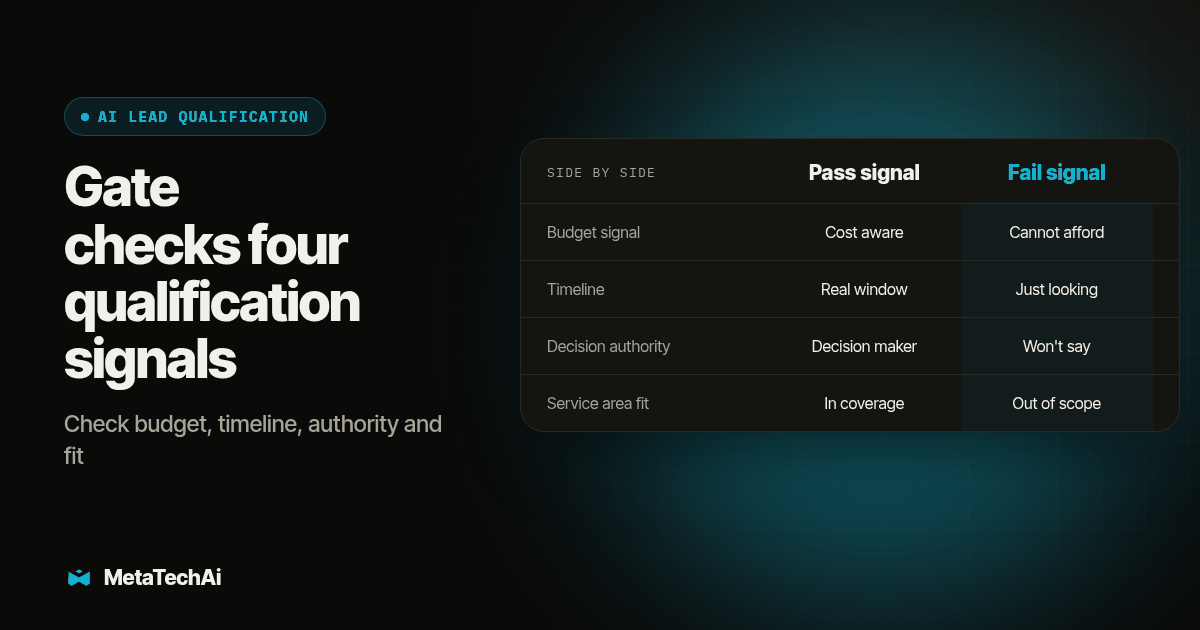
TL;DR: A trustworthy AI qualification gate checks four things before a lead reaches a rep: a real budget signal, a timeline that is not indefinite, the authority to actually decide, and a fit with the service area or offer. Set the pass and fail thresholds from your own closed and lost deals, not a generic script, and route anything borderline to a human instead of a silent fail. Then audit a sample of what the AI rejected every week, because a bad threshold bleeds revenue quietly, long before anyone notices the pipeline got thinner.
For a service business that puts AI between an inbound inquiry and the sales team, the key decision is what it should ask and how strict it should be before handing a lead to a rep. The gate matters more than the chatbot wrapped around it. Ask the wrong questions or borrow thresholds from a generic template, and reps may get unsuitable leads while ready buyers are held back.
What Should an AI Actually Ask Before a Lead Reaches a Rep?
Keep the list short. Salesmsg's research on AI-run SMS qualification makes a point we agree with: if a question does not change the routing decision, cut it, and keep each question short enough to answer in one line (Salesmsg, "AI Lead Qualification"). That rules out most of the long intake forms service businesses borrow from a generic CRM template. We build around four fields instead.
Budget signal. Not a number pulled out of the lead, but evidence they understand roughly what a project like theirs costs and have not flinched. For a home services or clinic sales process this might be "have you gotten a quote for this kind of work before," not "what is your budget," which most leads will not answer honestly over text.
Timeline. A lead who says "sometime next year, maybe" is not the same lead as one who says "we need this fixed this month." The AI should capture the actual phrase, not force it into a dropdown, because the wording itself is a signal a rep can use on the first call.
Decision authority. Ask who else needs to agree before they can move forward. A homeowner calling about their own roof is different from a property manager who needs sign off from an owner three states away. Neither is disqualifying on its own, but the rep needs to know which conversation they are walking into.
Service area and offer fit. This is the cheapest check to automate and the one teams skip most often. If your business does not serve a ZIP code, does not handle a property type, or the lead is asking about a service you do not offer, no amount of budget or urgency fixes that. Fail it immediately and route it somewhere useful, even if that is just a polite referral, instead of letting a rep discover the mismatch five minutes into a call.
Which Combinations Should Pass, and Which Should Fail?
A single weak answer should rarely kill a lead on its own. The combination matters more than any one field, which is why we score each field independently and only fail the lead on the combination.
| Field | Pass signal | Fail signal | What happens next |
|---|---|---|---|
| Budget signal | Confirms rough cost awareness, no objection to a paid visit or quote | Explicitly says they cannot afford any version of the service | Route to self-serve content, do not assign a rep |
| Timeline | Names a window inside your normal sales cycle, even a loose one | States they are "just looking" with no trigger event | Hold for nurture, recheck in 30 to 60 days |
| Decision authority | Is the decision maker, or names the other approver clearly | Cannot or will not say who else is involved | Pass with a flag; rep confirms authority on the first call |
| Service area or offer fit | Inside your coverage area and service list | Outside coverage, wrong service type, or regulatory mismatch | Hard fail; no rep assignment |
Notice that only the service area row gets a hard fail. Budget and timeline soft fails should go to nurture, not the trash, because a lead who is not ready today can still be the lead who converts in a quarter. We flagged the same distinction in Is It a Lead Quality Problem or a Follow Up Problem?: a soft fail that gets no further contact looks identical to a bad lead in your reporting, even though the two need completely different fixes.
How Do We Set the Pass and Fail Thresholds Without Guessing?
Do not start from a framework. Start from your own CRM. Pull your last batch of closed won and closed lost opportunities and look at what the lead actually said about budget, timeline and authority at the point of intake, not what you wish they had said. That becomes your threshold, and it is the only version of the threshold that reflects how your specific buyers actually talk.
- Pull 40 to 60 recent opportunities, split roughly evenly between closed won and closed lost, with intake notes or call transcripts still attached.
- Write down the actual phrases each lead used for budget, timeline and authority, not a summary. "We're not in a rush" and "end of the year, for sure" are different timelines even though both would get coded "future" on a form.
- Sort the phrases into pass, soft fail and hard fail buckets based on what actually closed versus what did not, not on how confident the phrase sounds.
- Draft the AI's qualifying questions so they are built to surface exactly those phrases, phrased the way your buyers phrase them, not the way a sales textbook phrases them.
- Write the routing rule for every combination: which fields can soft fail together before the lead gets held instead of passed, and which single field is a hard fail on its own.
- Run the gate silently for one to two weeks against live inbound leads without letting it block anyone, logging what it would have done.
- Compare the silent run against what reps actually did, adjust any threshold that would have rejected a lead that converted, and only then let the gate start holding leads back.
That silent run in step six is the step most teams skip, and it is the one that catches a threshold that is too strict before it costs you a real deal.
What Does a Working Qualification Script Look Like?
Here is a copy-paste starting point for a four-question text or chat script. Adjust the wording to your own service, but keep the structure: short, specific, and each answer changes what happens next.
- "Thanks for reaching out. Are you looking to get this done in the next few weeks, or just gathering information for later?"
- "Got it. Will you be the one approving this, or is someone else involved in the decision?"
- "What's the property or service address this is for?" (checked against your coverage list automatically)
- "Have you gotten a quote for a project like this before, so I can match you with the right person?"
- Disclosure line, required: "Quick note: you're chatting with an AI assistant right now. I'll pass this along to our team with everything you've told me."
Pair the script with a hard stop rule: any mention of a complaint, a safety issue, or a request to speak to a person immediately routes to a human, no matter what the other four answers say. That rule matters more than any scoring logic, because an AI that keeps qualifying a lead who already asked for a human is the fastest way to lose a lead that was never actually at risk.
How Should We Audit the Leads the AI Rejected Every Week?
This is the step that protects you from the gate quietly bleeding revenue. A gate that silently fails leads creates a blind spot: the team cannot see whether a rejected inquiry was genuinely out of scope or simply misclassified. Review the rejected records directly rather than assuming that a thinner pipeline means lead generation changed.
- Pull every lead the AI hard failed or held in nurture over the past week.
- Read ten of them at random, not the ones your reps flagged, because the ones nobody flagged are the ones the gate might be getting wrong silently.
- Check two things on each one: did the fail reason match what the lead actually said, and would a human reviewing the same transcript have made the same call.
- Count disagreements. Record every disagreement and group them by reason. A repeated pattern, such as service area failures concentrated in one ZIP code, is a signal to check the threshold or the coverage data.
- Log the fix and the date, and recheck that specific category again the following week to confirm the fix actually held.
This review can also reveal an AI agent that books few meetings. Before canceling it, inspect where leads exit qualification and compare those records with what a rep would have done.
What Happens When the Gate Is Wrong, and How Fast Will We Know?
A gate that is too loose shows up fast: reps complain, call time goes up, close rate drops, and someone notices within a week or two. A gate that is too strict is slower and more dangerous, because the symptom is just a quieter pipeline, and a quieter pipeline looks like a lead generation problem instead of a qualification problem. Teams chase ad spend or SEO to fix a shortage that the gate itself is causing.
Watch for three early signs instead of waiting for the monthly pipeline report: a rising hard fail rate on service area or offer fit without a matching change in your actual coverage, reps asking why a specific referral source's leads keep disappearing, and a soft fail bucket that grows every week without anyone working it. Any one of those is worth pulling the weekly audit forward instead of waiting for the next scheduled check. When MetaTechAi builds and manages this layer as part of a broader managed AI service engagement, the weekly audit and threshold tuning are part of what our specialists are watching, under the standing guarantee that conversions go up or you do not pay.
How Is a Qualification Gate Different From Verifying an AI Lead Score?
The two get confused because they both sit near the top of the funnel, but they answer different questions. A qualification gate decides whether a lead gets into your pipeline as a live opportunity at all; a lead score ranks the leads that are already inside it. We wrote a full audit process for the second question in AI Lead Scoring: What to Verify First, covering training data, decay rules and why a score needs a visible reason attached before a rep will trust it.
Run both checks, and run them in the right order. A perfectly verified lead score sitting on top of a dirty intake gate will still produce a confidently ranked queue of leads that should never have been let in. Fix the gate first, then verify the score, not the other way around. And once a lead actually passes the gate, the next failure point is usually speed, not quality; we touched on the ceiling of how many qualified leads one rep can actually work in How Many Leads Can One Sales Rep Handle?, which matters because a strict, well-tuned gate that still overloads your one available rep has not solved anything. Agencies building this same pass and fail logic for their own clients face an extra wrinkle, matching one gate to several different client offers and coverage areas at once; RizzDial covers that version of the problem in a companion look at AI lead qualification automation for agencies.
What Else Do Service Sales Teams Ask About an AI Qualification Gate?
How long does it take to set up an AI qualification gate?
Plan on a short build using questions pulled from your own closed and lost deals, then a silent run where the AI scores leads without blocking anyone, before you let it hold a single lead back. The silent run is the part teams skip, and it is the part that catches a bad threshold before it costs you a real deal.
Does this work with our existing CRM or dialer, or does it need a separate platform?
A qualification gate is a set of questions, thresholds and a routing rule, not a new system. It can live inside GoHighLevel or whatever CRM already holds your pipeline, as long as the fields it writes to are the fields your reps and your reporting already read from.
Do we have to tell a lead that an AI is asking these qualification questions?
Use a clear AI identity disclosure before the agent asks qualification questions. The exact legal requirements can depend on the channel and location, so review the live workflow for the rules that apply to your business. The gate is not a reason to hide that a person is interacting with AI.
What does an AI qualification gate cost, and is it covered by MetaTech's guarantee?
We do not publish a flat number because the scope depends on how many questions, channels and CRM fields are involved. When MetaTechAi builds and manages the gate, it falls under our standing guarantee: conversions go up, or you do not pay. Agree on the baseline and the measurement window in writing before work starts.
We already built a lead score. Does a qualification gate replace it or sit next to it?
It sits next to it, earlier in the funnel. A lead score ranks leads that are already in your CRM; a qualification gate decides whether a lead gets into the CRM as a live opportunity at all. Verify the score the way we describe in our lead scoring piece, and build the gate the way we describe here, because a trustworthy score built on a dirty intake gate still produces a dirty queue.
If you want this gate built, tuned and audited as part of a managed engagement instead of maintained in house, talk to our team about managed services and we will scope the questions, thresholds and weekly audit around your own closed and lost deals before anything goes live.