
Is Your AI Sales Tool Frustrating Customers? What to Check
By MetaTechAi ·
TL;DR: An AI sales tool is probably hurting you, not helping, if customers hit the same dead-end chatbot reply twice, if automated follow-up keeps firing after someone already responded, or if nobody on your team can name the exact moment a conversation gets handed to a person. Run the five-point audit below on your actual conversation logs, not on your assumptions about the tool, and fix the specific step that is losing the customer instead of replacing the whole system.
An AI sales tool can frustrate customers when it repeats questions, ignores replies or blocks access to a person. Check conversation logs, follow-up stop rules and human handoffs before changing the whole system. MetaTechAi installs AI sales and marketing systems for service businesses with sales teams; this diagnostic helps those teams identify a specific workflow failure they can test and correct.
Why Is AI Frustration Showing Up as a Real Complaint Category in 2026?
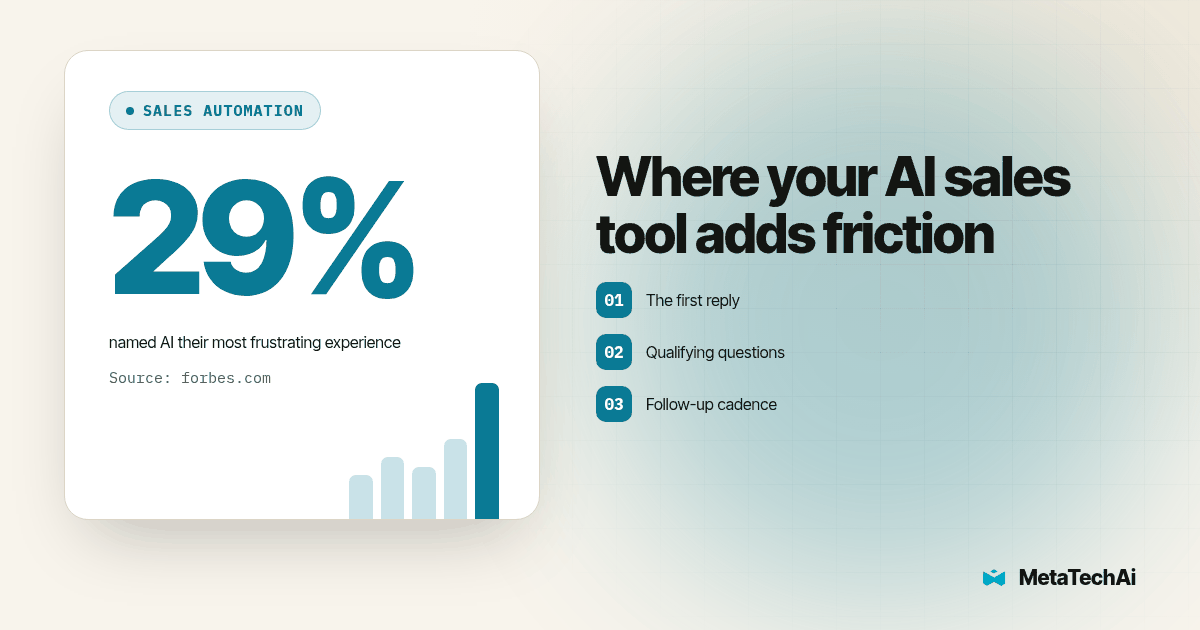
In a February 2026 Forbes Business Council article, Natalie Ruiz describes an AnswerConnect-commissioned OnePoll survey of 6,000 adults across the United States, United Kingdom and Canada. The article reports that 29 percent named talking to AI as their most frustrating service experience, while 53 percent trusted companies less when customer service relied heavily on automation. It also reports that 89 percent preferred a person when contacting a healthcare provider.
These are reported customer service survey results, not measurements of sales conversion or proof that your particular tool loses deals. They provide a reason to investigate customer friction. The diagnostic below is an operational proposal for your own logs, not a conclusion drawn from those percentages. Look for what the customer asked, what the system did and whether a useful next step followed.
Where in the Sales Process Does an AI Tool Actually Create Friction?
Not every AI touchpoint carries equal risk. Check these four points separately, because each can fail in a different way. The risk labels below are review priorities, not measured industry rankings.
- The first reply to an inbound lead. Lowest risk. A fast, correct acknowledgment ("got it, here's what happens next") rarely annoys anyone, because the alternative is silence. Test whether your acknowledgment also answers the actual request; speed alone does not establish usefulness.
- Qualifying questions. Medium risk. A scripted flow works until the customer gives an answer it did not anticipate, and the bot loops back to a question it already asked or gives a generic non-answer. Mark that loop for review rather than assuming the customer is unqualified.
- Follow-up cadence. High risk. This is where "robotic" becomes literal: a fixed sequence of touches that keeps firing on schedule even after the customer already said yes, said no, or asked to be left alone.
- The moment something goes wrong. Highest risk. A billing dispute, a complaint, an upset customer, or a question outside the tool's training. This is the exact moment customers most want a human, and a useful place to test whether escalation actually works.
The pattern across all four: check the edges of the tool's approved scope as carefully as its routine tasks. A tool excellent at acknowledging a new lead quickly can be the same tool that cannot tell when a customer has stopped wanting to talk to it.
What Could These Problems Look Like for a Sales Team?
Consider a hypothetical B2B team whose AI caller produces few meetings. A manager might blame the voice or rewrite the opening script. A transcript review could instead reveal that the follow-up workflow keeps dialing contacts who already declined. The booking total identifies a disappointing outcome, but it cannot identify the cause on its own. Read the refusal, the disposition saved in the CRM and the next scheduled action together.
In another hypothetical example, a business development center, or BDC, calls a lead while an AI sequence sends texts to that same person. Neither owner sees the other's work. The buyer receives overlapping requests even though each workflow appears correct in isolation. The audit should put all channels on one timeline, then locate the missing ownership or stop rule.
These examples are test scenarios, not client case studies. Use them to ask a concrete question about your own records: did the customer stop engaging because of a visible workflow failure, or is that only one possible explanation? Record alternative explanations such as a changed project timeline, a poor service fit or an unresolved question about the offer.
How Do You Run a Friction Audit on Your Own AI Sales Tool?
Use this five-step procedure before changing configuration. The suggested sample size and review interval are starting points for a manageable audit, not statistical thresholds or promised completion times.
- Pull 20 to 30 recent conversations where the deal went cold right after an AI touchpoint. Start with stalled conversations to locate possible failures, then compare a similar set that progressed. A stalled-only sample cannot estimate the overall failure rate.
- Read each one start to finish, as the customer experienced it. Do not skim for the outcome. Friction almost always shows up mid-conversation, not in the last message.
- Tag each cold conversation by failure type: repeated question, ignored "stop contacting me" request, wrong information, follow-up that continued after a response, or no visible path to a human. A simple spreadsheet works; you are building a frequency count, not a research paper.
- Rank the tags by frequency, not by how bad any single example looks. Repeated tags help prioritize investigation; they do not prove lost revenue. Escalate ignored stop requests or incorrect commitments immediately even if they appear only once.
- Fix the single highest-frequency failure first, then re-run the audit in two to three weeks. Record the change and compare similar conversations afterward. Pause unsafe behavior immediately rather than waiting for the scheduled review.
This is a reading exercise before it is a configuration exercise. Keep a review sheet with conversation ID, channel, customer request, system response, failure tag, proposed correction and owner. Separate observed facts from your interpretation. "Customer asked for a person and received another qualifying question" is observable; "customer left because they dislike AI" may not be.
Before restoring a changed workflow, replay the failed scenario with a test contact. Have one reviewer act as the customer and another watch the CRM queue. Check that the handoff carries the transcript, prevents duplicate follow-up and gives a named person responsibility. Save the expected result beside the actual result so the next reviewer can reproduce the test.
Where Does AI Speed Things Up Versus Where Does It Add Friction?
| Sales process step | Signal AI is helping | Signal AI is adding friction |
|---|---|---|
| First response to a new lead | Acknowledgment arrives in seconds, customer proceeds to next step | Generic reply arrives late or doesn't match what the customer actually asked |
| Qualifying questions | Customer answers move the conversation forward each time | Same question gets asked twice, or an answer gets a non-answer in response |
| Follow-up cadence | Touches stop once the customer responds, books, or opts out | Touches continue on the old schedule after a reply, a booking, or a stop request |
| Escalation to a human | Customer who asks for a person gets one within the same conversation | Customer has to ask more than once, or gets looped back to the same automated flow |
| Sensitive or emotional moments | Flagged and routed to a rep before a scripted reply goes out | A scripted, generic reply goes out regardless of tone |
The right column is a checklist of what to go looking for in step 2 of the audit above. If you find your tool landing in the right column at even one row, that row is where your next fix belongs.
When Should a Human Be Pulled Back Into the Process?
Set this as a rule, not a judgment call your team has to make fresh every time, because judgment calls made under time pressure default to whatever is easiest, which is usually "let the bot keep handling it." Consider these starting rules inside your CRM routing logic, then test them against your own workflow:
- Repeat trigger: the same question or objection appears twice from the same customer. Route to a person on the second occurrence, not the third.
- Negative-language trigger: words like "cancel," "refund," "complaint," "frustrated," or "speak to a person" route immediately, while suppressing further automated sales replies.
- Value trigger: accounts above a set deal size or lifetime value get a human touch at the qualifying stage regardless of how well the bot is performing, if your account policy calls for closer review.
- Silence trigger: if a customer has not responded after two automated follow-ups, pause the sequence for human review before deciding whether further contact is appropriate.
This is the same boundary question we work through with clients in our guide on where an AI sales agent should and should not talk to customers directly rather than only preparing work for a rep. The short version: AI should own the touchpoints where speed is the main variable that matters, and a person should own the touchpoints where the customer's tone or the deal's size is the main variable that matters.
Copy-paste escalation checklist
Run this against your current AI tool's configuration today:
[ ] Does a repeated customer question (2nd occurrence) route to a human?
[ ] Does a cancellation/complaint/refund word trigger an immediate human route?
[ ] Does follow-up stop the moment the customer replies, books, or opts out?
[ ] Do accounts above your approved deal-value threshold get a human touch at qualifying?
[ ] If a customer asks for a person in one conversation, does a named rep receive the request?
[ ] Can anyone on your team name, in one sentence, the exact rule that hands a
    conversation from AI to a rep?
If the last line stumps your team, that is the real finding. A rule nobody can state out loud is a rule that is not actually being enforced, no matter what the system documentation says it does.
What About AI Voice Calls Specifically?
Voice carries its own version of this problem, and it is worth testing before customers do it for you. Robotic pacing, talking over a customer, or missing a cue that the conversation needs to shift to a human shows up as dead air or an awkward interruption, which reads as worse than a bad chatbot reply because it happens in real time with no way to reread it. Before you put a voice agent in front of real customers, run it through a live demo call yourself and listen for exactly those moments, using RizzDial's demo as a place to evaluate AI calling. MetaTechAi is the parent company behind RizzDial. Test your own scenarios rather than treating a demonstration as proof of production performance.
We also cover the live-call version of the human-handback question in our guide on real-time AI call coaching, which looks at whisper-style coaching that nudges a rep mid-call instead of replacing the rep outright. The same principle applies here: decide whether the task calls for assistance to a rep or direct customer contact, and test that choice.
What Changes Once You've Found the Friction Points?
Once the audit turns up a ranked list of failure patterns, identify which changes your team can control. A cadence cap, routing rule or fallback script may be enough for a first correction. Other failures may require integration work, better source information or a different escalation design. Assign each change to someone with the access and authority to implement it.
Track both the customer experience and the business outcome. A lower count of repeated questions is useful, but check whether customers also reach the right rep, book a suitable next step or get a clear answer. Keep the lead source, channel and review period visible when comparing results so a change in lead mix does not masquerade as an improvement.
If your team needs help installing and operating the system, explore our managed AI sales systems for service businesses. MetaTechAi's positioning is tied to conversions: conversions go up or you do not pay. Define the measurement, baseline and engagement terms with the team rather than assuming an activity increase proves the guarantee has been met.
What Do Service Sales Teams Ask About AI-Driven Customer Frustration?
How do we know if our AI tool is driving customers away instead of helping close deals?
Use a manageable starting sample, such as 20 conversations that stalled after an AI touchpoint, and read each in order. Tag repeated questions, requests for a person, incorrect answers and follow-up after a reply. Compare with conversations that progressed. Repeated failures justify investigation, but a small sample or a silent customer does not prove that AI caused a lost deal.
What's the fastest way to add a human escalation path without rebuilding the whole sales process?
Start with a routing rule for explicit requests for a person, complaints and repeated unanswered questions. Pause automated sales follow-up and send the transcript to a named rep. Test the queue and an unavailable-rep fallback before relying on it. Keyword matching can miss context, so review examples and give customers a direct way to request help.
Does pulling a human back in for certain moments slow down the whole sales process?
It depends on staffing and the handoff design. Keep suitable routine tasks automated, but route exceptions with the context a rep needs. Measure time to useful help rather than just time to the first reply. If the human queue becomes a bottleneck, adjust coverage and scope instead of silently returning the customer to the same failed flow.
How long does it take to fix an AI sales tool that's already generating complaints?
The time depends on the failure, your access to configuration and the work needed to test a correction. A routing change and a broken integration have different scopes. Assign an owner, pause the problematic behavior where needed and confirm the expected result with test contacts. Do not promise a completion date before checking those dependencies.
Does this diagnostic apply to AI voice agents and AI chat or text tools the same way?
The checkpoints are the same across channel, but the symptoms look different. On chat or text, friction shows up as dead-end replies and repeated scripted messages. On voice, it shows up as pacing that sounds robotic, talking over the customer, or failing to flag that a human needs to take over a sensitive call. Run the audit separately for each channel your AI tool touches, because a tool that passes on text can still fail on voice.