
Switching AI Sales Vendors Without Losing Your Data
By MetaTechAi ·
Before switching AI sales vendors, export recordings, transcripts, CRM notes and lead-scoring history, then test them in the destination system. Keep source records under your business's control and confirm access deadlines before canceling the old account.
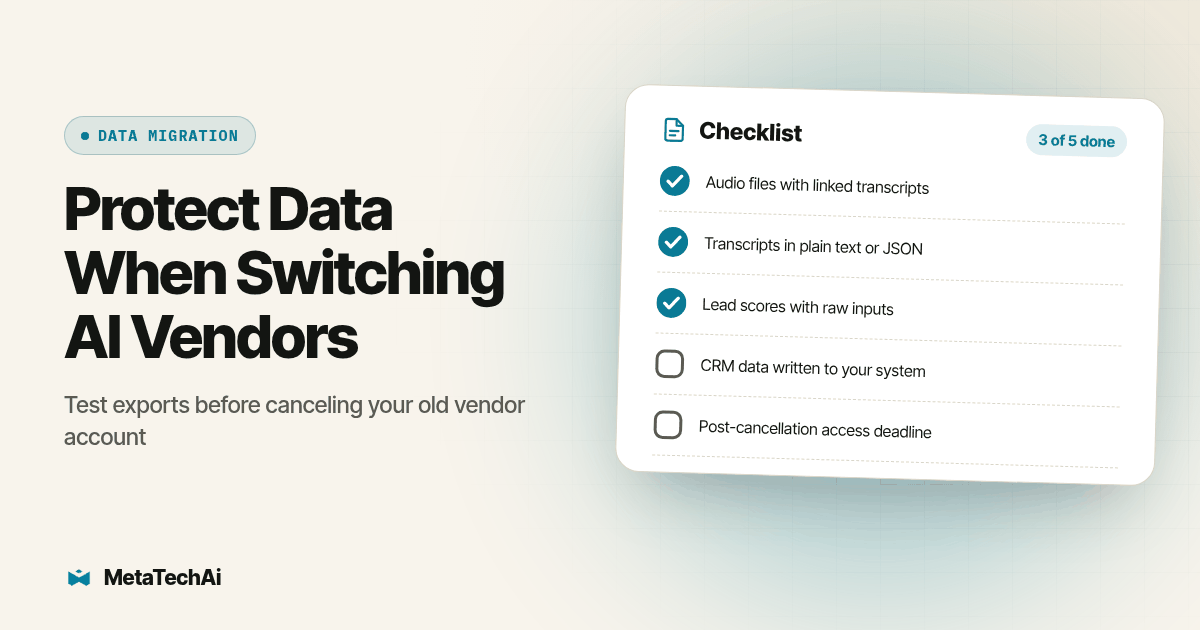
A service business switching AI sales vendors can lose access to the context its sales team needs for the next conversation. Requiring standard export formats is a start, but the practical protection is proving that files open, records match the right lead and historical activity stays readable without the old vendor login.
Use the checklist below to scope a vendor transition alongside managed sales system services. The decision is about more than features: what happens to the history your team already built if the replacement cannot use it? Treat the procedure as a proposed acceptance test, not a claim about completed client migrations.
Why Does Switching AI Sales Vendors Risk Losing Data in the First Place?
An AI sales tool may store recordings, transcripts, summaries and scores in separate places. A CRM contact export does not establish that every related activity or media file is included. Map each output to its storage location and retrieval method before deciding that a download button covers the entire account.
No Jitter's April 23, 2026 reporting describes accumulated context and AI outputs as potential sources of switching friction in unified communications (No Jitter). That reporting identifies a risk to investigate, rather than establishing that every sales platform loses data. Ask both vendors to show how the information your reps use will survive the change.
For a concrete product example, HubSpot's export documentation distinguishes current record properties and associations from activities such as calls and notes, which use other export routes. The lesson for your migration is to inventory those categories separately. Do not treat a contact spreadsheet as proof that the conversation history has also been preserved.
What Data Actually Gets Lost When a Service Business Switches AI Sales Vendors?
Start with three categories that can fail differently. These are migration risks to test against your own account, not measured failure rates across vendors.
Call recordings may arrive separately from transcripts and AI analysis. You could keep the audio file but lose the note, summary or tag that made it useful to a rep. Require a stable call identifier and contact identifier linking those files. Open the downloaded audio independently instead of relying on a playback link that still needs the old account.
Transcripts and AI summaries need their own format and mapping checks. Ask whether speaker labels, timestamps and corrections are included, and distinguish the original transcript from a generated summary. A new tool may accept the text without displaying those relationships correctly. Compare the imported result with the source, including an example with multiple speakers or a corrected customer detail.
Lead-scoring history requires both preservation and interpretation. An exported number can be retained as a historical value, but a new system may use a different scale or predict a different outcome. Save the score date, available contributing signals and rule or model version. If the old logic is unavailable, label the old score as historical instead of claiming the replacement reproduces it.
This is the same underlying problem we cover from the other direction in what your CRM needs before an AI sales system can help your team: a sales system, old or new, inherits whatever source data it has access to. If the source data lived only inside the vendor you are leaving, the new vendor inherits nothing.
What Should You Require Before You Sign With a New AI Sales Vendor?
Run this checklist against any vendor before a contract gets signed, current or prospective, and keep the answers in writing.
- List every data type the vendor will touch. Call recordings, transcripts, AI-generated summaries, lead scores, CRM notes, call dispositions, and any tags the AI applies during or after a call.
- Ask for a sample export of each data type, not a sales deck description of export capability. Agree on a delivery date and have the incoming vendor open the sample. Document missing fields and unresolved restrictions before accepting the export as usable.
- Confirm the export format for each file type. Audio should come as a standard format your other tools can open. Transcripts should come as plain text or structured JSON, not locked inside a PDF report or a proprietary viewer.
- Check whether lead scores export as raw inputs, not just a final number. Preserve the final score as history, but collect available inputs and version information so the new team can understand what it represented.
- Read the contract's data-access clause for the period after cancellation. Some contracts grant a short export window after the relationship ends and nothing after that; know the exact date your access closes before you need it.
- Ask what happens to data if you miss that export window. Some vendors delete on a schedule, others retain data but stop granting account access, which functionally has the same result if you have not already exported.
- Confirm whether the vendor charges for export or for keeping historical access open. Ask for the applicable contractual terms before you sign, rather than discovering an unexpected condition during cancellation.
- Review recording permissions and retention before transferring files. Have counsel assess the actual disclosure, permitted uses, recipient access and applicable requirements. A generic recording notice does not by itself prove that reuse by a replacement provider is permitted.
- Test the export path once while you are still a paying customer, by actually requesting and opening a full export, not just asking support to confirm the feature exists.
- Put the source data somewhere outside any single AI tool, a CRM record, a shared storage location, or a data warehouse you control, so the next switch starts from your own records instead of a vendor's.
Copy these ten items into a review sheet with columns for the current vendor, prospective vendor, evidence file, responsible owner and unresolved issue. Mark an item complete only when the evidence supports it. A verbal assurance belongs in the open-issue column until it is demonstrated or put in writing.
What Can Go Wrong With Each Data Type, and What Should You Demand in Writing?
| Data type | Migration risk to test | What to demand in writing before you sign |
|---|---|---|
| Call recordings (audio) | Audio arrives without linked transcript and AI tags | A standard audio format, plus confirmation the export keeps the link to its transcript and call metadata |
| Transcripts and AI summaries | Text or summaries lose structure during import | Plain text or JSON export, generated on request, not locked inside a dashboard-only report |
| Lead-scoring history | Historical values use a different scale or unavailable scoring logic | Export of the raw signals behind the score (call outcomes, response times, engagement events), not just a final number |
| CRM notes and dispositions | Depends on whether the AI tool writes back to your own CRM or keeps its own log | Confirmation the AI tool writes activity directly into your CRM record, not only into its own internal log |
| Consent and disclosure records | Evidence remains accessible only through the outgoing vendor | The dated disclosure version and associated consent records, with approved retention and access rules |
How Do You Keep Your Source Data Outside Any Single AI Tool?
The checklist above protects you during one switch. The real fix is structural: decide, before you ever sign with an AI sales vendor, which system is the permanent source of truth for your leads, calls and scores, and treat every AI tool as something that reads from and writes to that system rather than something that owns the data itself.
For a service business, the CRM can be the source of truth for lead identity, with a controlled archive for larger media files. A voice agent, a chat tool, or a lead-scoring layer should write its outputs back into CRM fields and activity records your business controls, so that if you ever change which AI vendor sits on top of the CRM, the history underneath it does not move at all. We cover the architecture decision behind that choice, build your own system versus a platform like GoHighLevel, in build your own CRM or use GoHighLevel, and the planning work of mapping which tool should own which piece of your sales stack in AI infrastructure planning.
Make the archive operational, not just a folder nobody can find. Assign an owner, restrict access and document how a rep reaches the correct recording from the CRM. Retention and deletion rules should cover the archive as well as the live platform. Keeping a second copy does not mean keeping every recording indefinitely.
How Do You Know If You Are Already Mid-Contract and Should Worry?
If you are not currently planning a switch, inspect the contract now. Find the cancellation notice deadline, export window, retention policy and named support contact. If those terms are unclear, request written clarification while the relationship is active. Do not assume a particular grace period. Schedule the export and validation work before the earliest confirmed access cutoff, leaving room to correct missing records.
If a vendor is not delivering the results that justified the switch to AI in the first place, that is a separate but related problem worth diagnosing before you decide whether to leave; our audit for an AI agency not delivering results walks through how to tell whether the problem is the vendor, the setup, or the data feeding it.
How Can You Prove the Export Works Before Canceling?
Run this proposed acceptance test using authorized records in a restricted test destination. Keep outbound calls, texts and follow-up triggers disabled during import. The objective is to prove that history remains usable without creating duplicate customer contact or overwriting current sales activity.
- Choose a representative sample. Include a completed call, a corrected transcript, a lead with several activities, a historical score and a record with contact restrictions. Write down the expected files and associations before exporting.
- Capture a manifest. Record each source identifier, contact identifier, timestamp, file type and export status. Count expected records by category, and log missing or intentionally excluded items with a reason.
- Open files without the old dashboard. Play the audio and read the transcript using authorized destination access. A link that opens only while signed into the old account is not an independent archive. Test the actual downloaded file.
- Import and reconcile. Match the sample to the intended CRM records. Check timestamps, speaker labels, notes and score versions. Repeat the same import to verify that the process does not duplicate activities or silently replace newer information.
- Get operational acceptance. Ask a rep to reconstruct the next appropriate action from the migrated history. Have the data owner approve the evidence and unresolved exceptions. Keep the old account available until the agreed acceptance conditions are met.
Twilio's recording API documentation illustrates why media retrieval deserves a separate check: recording metadata and downloadable media are distinct resources, and audio can be requested in WAV or MP3 format. This is an example of documented retrieval behavior, not a claim about your vendor's export implementation.
Plan the final cutover after the sample passes. Record the export cutoff time, capture activity created afterward and reconcile that final increment before turning on the replacement's workflows. Keep a rollback owner and a written decision point if records are missing. Cancel only after the responsible business owner accepts the migration evidence and the agreed retention arrangements.
Recording use also requires a separate review. Twilio's legal considerations for recording note that requirements can affect consent, use, disclosure and security. Ask counsel to assess your actual migration rather than treating technical access to a file as permission to reuse it.
What Do Buyers Ask Before Switching AI Sales Vendors?
How long does it take to build a portable data layer before switching AI sales vendors?
The timeline depends on data volume, export access, field mapping and the destination. Schedule the work after inspecting a sample rather than assuming a weekend or a fixed number of weeks is enough. Start while the current account is active, with named owners and time to fix missing files before the cancellation deadline.
Does switching AI sales vendors always mean rebuilding lead-scoring history from zero?
No. Preserve historical scores and their timestamps where available, along with the raw activity signals and scoring version. A replacement may calculate a new score from those signals, but that does not make the new value equivalent to the old one. Validate the new ranking separately and label historical values clearly.
Will a new AI sales vendor integrate with the call recordings and transcripts the old vendor exported?
Only a sample import can establish that. Standard audio and plain-text or JSON transcripts help, but the destination still needs to support their structure and record associations. Require the new vendor to demonstrate playback, readable text and correct contact matching before you approve the full migration.
Is it legal to keep call recordings if the original consent disclosure only named the old vendor?
Have counsel review the actual disclosure, permitted purposes, participant locations, access arrangements and retention obligations before transferring or reusing recordings. Neither a generic notice nor naming a vendor alone settles that question. Keep the review decision with the migration record and apply it to both the archive and the replacement system.
What does switching AI sales vendors actually cost if data portability was never set up?
The work can include export preparation, field mapping, storage, import development and staff review. Missing context can also force reps to repeat qualification work. Request a scoped transition estimate after the sample test, and document which history can be preserved, which requires transformation and which cannot be recovered.
What Should You Do Next?
Run the ten-item checklist against your current AI sales vendor's contract this week, even if you have no plan to switch, so you know the access deadline in step five before planning a cancellation. If you are evaluating a new vendor, make the sample-export request in step two part of the demo, before any contract is on the table. The same checklist applies to any tool that holds a channel of buyer history your team relies on. Beam's own guide to switching iMessage API providers without losing message history walks through the equivalent audit for a texting line, which is worth a look if your sales stack includes a texting vendor alongside the voice and CRM pieces covered here.
If you want this data-portability layer built into your sales system from the start, under the conversions-up-or-you-don't-pay guarantee, that is the kind of infrastructure decision we scope before any AI vendor goes live, not after the first one needs replacing.