
Can AI Handle a Live Sales Objection, Not Just Score It?
By MetaTechAi ·
A live objection-prompt tool can put a suggested response on a rep's screen while the buyer is still talking, which is a specific use of live coaching and a different job from grading the call afterward. It helps only if the audio pipeline detects the objection and renders a short prompt before the rep needs to answer, and even then a rep who reads it word for word instead of saying it in their own voice will still sound scripted to the buyer.
A sales manager asking whether AI can help "in the moment" is really asking two separate questions that get sold as one product: can it hear an objection as it happens, and can it get useful guidance back to the rep before the moment passes. We install AI sales systems for service businesses with sales teams, and live objection handling deserves a separate evaluation from post-call scoring or general delivery coaching.
What is live objection-handling AI, and how is it different from a whisper coach?
The labels overlap: whisper coaching can include objection prompts as well as delivery cues. Our breakdown of real-time AI sales call coaching covers the broader category. For this comparison, delivery coaching means cues about tone, talk ratio, and pacing. Live objection-prompt AI does something narrower: it listens for a specific trigger, usually a keyword or phrase pattern tied to price, timing, authority, or a competitor name, and surfaces a short, specific response tied to that exact objection. Balto describes real-time agent guidance and answers during calls, so when a prospect says something like "we don't have budget," a response appears on the rep's screen before the rep has to go looking for one.
Caretta frames the same mechanism in three steps: the assistant transcribes the call as it happens, detects the moment a buyer pushes back, and retrieves a short response pulled from the company's own call history, battlecards, or CRM notes. That retrieval step matters. Require approved source material behind the answer. Some tools retrieve an existing card; others generate wording from retrieved context, so verify what the product actually does before treating its output as approved.
That distinction carries the whole value proposition, and the whole risk. Scoring the call afterward cannot change how this particular conversation goes, and a delivery-only coaching cue may not address the buyer's particular objection. Catching one defined objection and retrieving a pre-written response is narrower work, but speed and relevance still need testing on your calls.
What has to be true of the audio pipeline for a live prompt to not lag the conversation?
This is the part most sales managers never ask about in a demo, and it's the part that decides whether the tool helps or becomes background noise reps learn to ignore.
A live prompt has to clear four technical hurdles in close to real time. First, the call audio has to stream to a transcription engine continuously, not in batches, or the system stays a sentence or two behind what's actually being said. Second, the system has to detect the objection pattern in that live transcript, matching against a keyword or phrase library tuned to how your specific buyers talk, not a generic list a vendor ships out of the box. Third, it has to retrieve the matching response from wherever it's stored, which you should test against a focused, current objection library as well as any broader knowledge search. Fourth, it has to render that response on the rep's screen in a format they can understand at a glance. Caretta's own framing of the failure mode is blunt: if the prompt arrives after the rep has already stumbled through an answer, it's a post-mortem, not help.
Any one weak link breaks the chain. Poorly organized source material can make relevant answers harder to retrieve, a keyword library copied from a different industry misses how your buyers actually phrase a price objection, and a cluttered prompt card that takes three seconds to read defeats the purpose even if detection was instant. For an evaluation, treat the audio pipeline and the objection library as two separate things to test, because a vendor demo tends to show a fast system responding to a scripted objection it already knows is coming, not your buyers' actual phrasing on a messy real call.
How does live objection-prompt AI compare with post-call scoring and coaching?
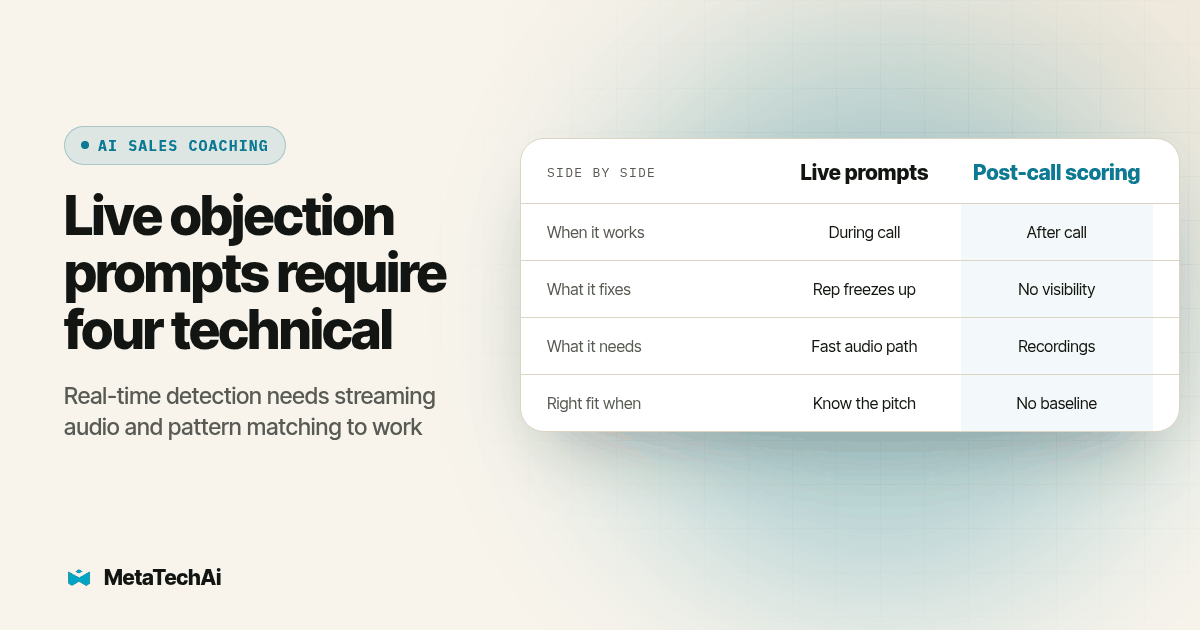
Compare the functions side by side. A single product may bundle all three; these are evaluation categories, not mutually exclusive vendor labels.
| What you need | Live objection-prompt AI | Post-call scoring | Delivery coaching (tone/pacing) |
|---|---|---|---|
| Timing | During the call, triggered by a specific objection | After the call ends, on the recording | During the call, but general cues, not objection-specific |
| What it fixes | A rep freezing or fumbling a known objection in the moment | No visibility into which behaviors separate good calls from bad ones | A rep's delivery (talking too fast, dominating the call) |
| What it needs | A tuned objection library, low-latency transcription, a fast retrieval layer | A scoring rubric and recorded calls; no live audio feed required | A live audio feed and a general coaching ruleset |
| What this function alone does not provide | A post-call scorecard or coaching trend | Help for the call currently in progress | An objection-specific answer unless that capability is also included |
| Right fit when | Reps already know the pitch but forget it under pressure on a defined set of objections | Nobody has reviewed a call in months and there's no rubric yet | Reps ramble, interrupt, or need pacing discipline, not word-for-word answers |
We cover the scoring side of this in more detail in our guide on what an AI sales call scorecard should actually measure. The short version for this comparison: scoring and live prompting answer different questions, and a team that buys scoring expecting it to save the call that's happening right now will be disappointed, because that is not the job it's built to do.
Where does a canned rebuttal fed live still sound scripted?
This is the honest limit of the category, and it's the thing a vendor pitch glosses over. A retrieved card may be a pre-written answer, while a generated suggestion may rephrase source material. If a rep reads it word for word, in the vendor's phrasing instead of their own, a buyer who has heard a sales pitch before will hear the seam. Caretta's own guidance acknowledges this directly: the rep should see a prompt card and deliver the answer in their own words, not read it off the screen like a teleprompter.
There's a second, sharper limit buried in that same guidance. Caretta also warns that a tool which helps a rep argue past a genuine disqualifier is actively hurting the pipeline, not helping it, and that these cards answer objections, they don't create pain or qualify a buyer who was never a fit to begin with. Live prompting assumes the discovery work already happened. If a rep is pitching someone who genuinely cannot buy, no fast rebuttal fixes that, and a tool tuned to keep producing comebacks can actually make a rep worse at recognizing a dead lead. We see the mirror image of this problem on the buyer side in our piece on selling to a buyer who already compared quotes: a scripted response to a question the buyer has already heard from three other vendors reads as exactly that, scripted, and the fix there is the same one that applies here, evidence over polish.
The practical guardrail is to treat every prompt as a starting point for the rep's own sentence, with exact approved wording preserved for sensitive claims such as security commitments, and to review a sample of calls specifically for where a rep leaned on a card word for word. If that happens often, the fix usually isn't a better card. It's coaching the rep on how to use the tool, which is a training problem, not a technology problem.
What is the test procedure before you trust a live objection prompt on a real call?
Run this before reps rely on prompts during customer calls. The sample sizes and durations below are a proposed starting procedure, not proven accuracy thresholds or a promise that every tool will be ready on that schedule. Confirm recording and monitoring permissions before collecting pilot calls. Skipping ahead because a demo looked sharp is exactly how a team ends up with a tool that fires wrong, late, or not at all on the calls that matter.
- Pull the ten to fifteen objections your reps actually hear most often from real call transcripts or CRM notes, not a generic list the vendor supplies, and build the trigger library from those specific phrasings.
- Write or approve one short response per objection with your own sales manager, in language your team would actually say out loud, not marketing copy.
- Run the tool silently for a full week, visible only to a manager watching the live transcript, so a wrong or late prompt never reaches a rep or a customer before anyone has checked accuracy.
- Time how long it takes from the moment the objection is spoken to the moment the prompt appears on screen, across at least twenty real calls, and treat anything that consistently lags more than a couple of seconds as not ready for rep-facing use.
- Check false triggers specifically: count how often the tool fires on something that sounds like an objection but isn't one (a buyer repeating a price back to confirm it, for example), since a noisy trigger teaches reps to ignore every prompt, including the correct ones.
- Move to a live pilot with one rep team for two to three weeks, and have a manager spot-check whether reps are reading the card verbatim or using it as a cue, flagging the former for coaching.
- Review the objection log after the pilot: which objections fired most, which responses reps actually used, and which cards were ignored, then retune the library before rolling it out past the pilot group.
What should the one-page evaluation checklist include?
Fill this out live during every vendor call so you're comparing the same categories across every pitch instead of trusting memory of three demos a week apart.
- Trigger library source: built from our own real objections, or a generic list the vendor ships by default
- Latency test result: measured seconds from spoken objection to on-screen prompt, across at least twenty real calls, not the vendor's demo reel
- False-trigger rate: how often the tool fires on something that isn't actually an objection, observed during our own silent pilot week
- Delivery format: in-window prompt beside the dialer, or a separate tab or extension competing for the rep's attention
- Rep usage check: percentage of flagged calls where the rep used the prompt as a cue versus read it verbatim, reviewed by a manager
- Disqualifier safeguard: does the tool ever suggest an objection response when the real issue is that the buyer isn't a fit, and how do we catch that
- Data ownership: can we export the objection log and response library if we leave, in a format we can read without the vendor's platform
What do buyers ask most about AI objection handling?
What does live objection-handling AI cost on top of a coaching or dialer platform we already pay for?
It varies by vendor, seat count, and whether real-time prompting is a separate module or bundled with post-call scoring, so we will not quote a figure here that will not match your stack. Get a quote scoped to your rep count and your current dialer, then weigh that recurring cost against what a managed rollout tied to a conversions-up-or-you-don't-pay standard would cost instead.
How long does it take before a live objection-prompt tool is accurate enough to trust on real calls?
Use a manager-only observation week followed by a two-to-three-week pilot as a starting plan, then extend it if your call volume or objection variety is too small to judge. Those are suggested evaluation windows, not a guaranteed tuning time. Trust should depend on observed accuracy, prompt timing, false triggers and rep judgment on your own calls.
Does a live objection-prompt tool plug into the dialer and CRM our reps already use, or is it a separate screen?
Ask for a live test in your own account, not a generic screen share. Check where prompts appear, whether the rep can see the caller record at the same time, and whether using the prompt interrupts their normal workflow. A separate tab or extension needs an adoption test; its presence alone does not prove the tool will be ignored.
Does listening live for objections raise call recording consent issues beyond what we already handle for coaching?
Recording, transcription and live monitoring can raise consent requirements, and adding AI does not remove them. Requirements depend on the jurisdictions and circumstances of the call, including participants' locations. Confirm the basis for recording and monitoring with qualified counsel before enabling the audio feed, and review disclosure, access, retention and deletion controls.
For state-by-state background, see the Reporters Committee recording guide.
If we turn off the live prompts later, do we lose the objection data we built up?
Ask before you sign, not after a renewal notice. Confirm you can export the objection log (which objections fired, how often, which responses a rep actually used) in a format you can read without the vendor's platform, because that log is the thing that lets you keep improving a rebuttal library even if you later switch tools or move to a different coaching vendor.
Where does this fit if you're building the whole sales system, not buying one feature?
A live objection prompt is one component inside a larger stack: the dialer that places the call, the CRM that holds the buyer's history, the transcription layer feeding the prompt, and the manager review that keeps the trigger library current. Buying the objection-prompt feature in isolation, without the infrastructure underneath it wired to the same CRM record and the same call data, tends to produce exactly the kind of second-screen tool reps stop opening after a few weeks. Our AI infrastructure work is built around mapping that full stack first, business tools, company memory, and workflows, so a feature like live objection prompting lands inside a system that's already wired to use it, instead of becoming one more disconnected login competing for a rep's attention mid-call. The same in-the-moment question comes up on the voice-agent side of a sales stack too; RizzDial's breakdown of warm transfer versus cold transfer for AI voice agents covers a similar decision about what an AI system should do live, in the moment, versus handing a buyer off cold.