
What Should an AI Sales Assistant Actually Do for Your Team?
By MetaTechAi ·
An AI sales assistant should draft first replies, book meetings, create CRM tasks and summarize calls. It should leave pricing, unusual requests and upset customers to a rep. Test the tools on real inquiries before giving one a role in your sales workflow.
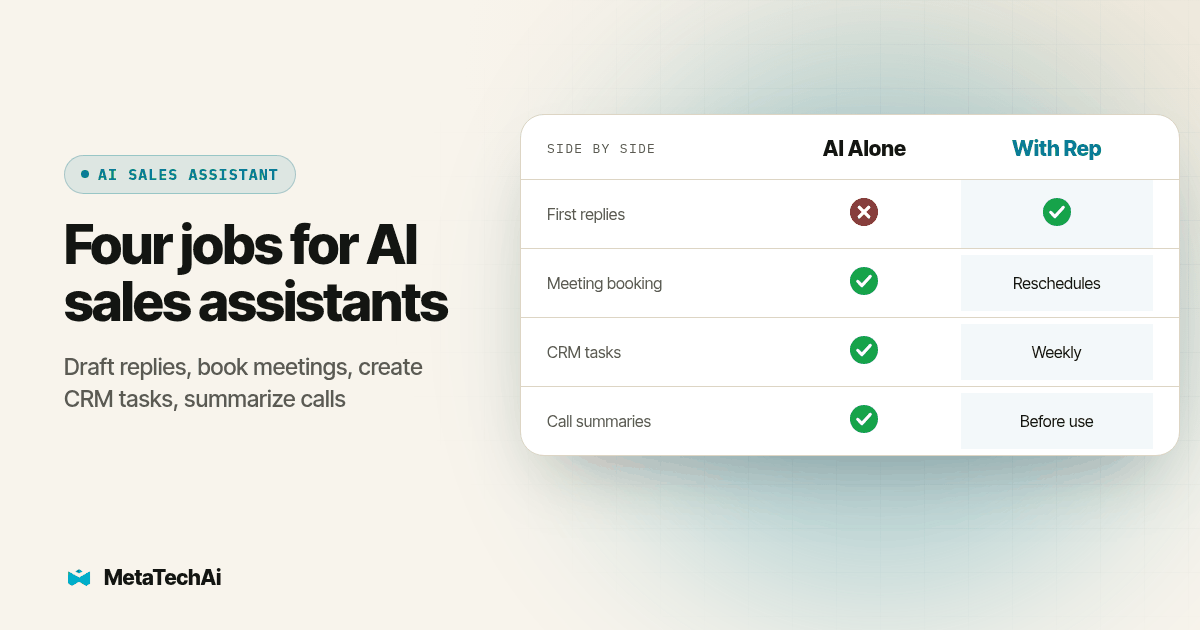
Service sales managers keep asking us some version of the same question: what is this thing actually supposed to do, and where does it stop? The honest answer is narrower than most vendor pages suggest. An AI sales assistant earns its seat on four jobs: first-reply drafting, meeting booking, CRM task creation and call summaries. Everything that requires reading a customer's mood, naming a price or making an exception stays with your rep.
What does "AI sales assistant" actually mean right now?
The term gets used loosely. Some vendors mean a Chrome extension that drafts an email. Others mean a tool that joins the call, transcribes it and updates the CRM without anyone touching a keyboard. Warmly describes AI sales assistants as tools that work with sales context rather than relying only on canned keyword replies (Warmly, 2026). Outdoo describes the administrative work around selling, including manual tasks and CRM updates across multiple tools (Outdoo, updated October 16, 2026). Those tasks illustrate the category's practical purpose. An AI sales assistant is not trying to replace the rep's judgment; it is trying to reduce repetitive work around a sale.
That distinction matters because it separates this buying decision from two others we get asked about just as often. If you are trying to redesign your whole intake-to-close workflow and decide which steps are high volume and low judgment versus which need a person, that is a process question, not a tool question; see our breakdown of what stays human in sales process automation. And if your question is really about whether an AI agent should talk to your customers directly at all, that is a contact-boundary and consent question, covered covered in AI sales agent customer contact boundaries. This article is narrower: you already have a sales team, you are looking at a specific tool category, and you want to know what it should be trusted to run alone.
What should an AI sales assistant run without a rep watching?
We configure these four jobs the same way across the service businesses we work with, because they share one property: a rep can review a wrong output before it reaches a customer or creates a compliance problem.
- First-reply drafting. The assistant reads the inbound message and the contact record, then drafts a reply that answers the question and proposes a next step. The rep reviews it, then sends, edits, or discards it. It should never send on its own for a first touch with a new contact; a human sends the first message a stranger receives from your business.
- Meeting booking. Once a lead has agreed to talk, the assistant can hold the calendar, offer times, handle reschedules and send reminders without a rep in the loop. This is close to pure logistics: there is a calendar, there is availability, there is a time zone. Little judgment is required once the lead has said yes to the idea of a call.
- CRM task creation. After a call or a reply, the assistant should create the follow-up task, log the outcome against the right pipeline stage, and flag anything it was not confident about for a person to check, rather than guessing and writing it in as fact.
- Call summaries. The assistant should produce a summary of what was said, decisions made and open questions, tied to the recording timestamp, so a rep or manager can verify it without re-listening to the whole call.
On the call-summary and transcription piece specifically, if your team is also looking at AI voice agents for outbound dialing or qualification rather than just summarizing human calls, that is a slightly different build; see voice AI use cases for agencies from our sister platform RizzDial for how that layer works on the calling side.
Which tasks run alone, and which still need a rep?
| Task | Run it alone | Rep reviews before it counts | Why |
|---|---|---|---|
| First-reply drafting | No | Yes, every time | A stranger's first impression of your business should not be an unreviewed AI guess |
| Meeting booking (after lead agrees) | Yes | Only for reschedule disputes | Pure calendar logistics once intent to meet exists |
| CRM task creation | Yes | Spot-check weekly | Low cost to fix a wrong task; high cost to have none created |
| Call summaries | Yes | Rep confirms before using it to brief a manager | Summaries can miss sarcasm, hesitation or a softened objection |
| Price or scope negotiation | No | Always a named rep | A customer is agreeing to a number; that has to come from a person who can be held to it |
| Handling an upset or confused customer | No | Always a named rep | Tone and de-escalation are not something to hand to a draft generator |
| Deciding an unusual request is an exception | No | Always a named rep, often with a manager | This is a judgment call that should remain with a person who understands the customer and the business |
What test should you run before you pay for any AI sales assistant?
Vendor demos are built to look good. Your own data is not. Run this seven-step test against a real sample of your inbound before you sign anything, and score it in writing so the decision is not just a gut feeling after a nice demo.
- Pull a useful sample of real inbound messages from the last 30 days, anonymized if needed, covering a mix of pricing questions, scheduling requests and vague inquiries.
- Let the tool draft a reply to each message in the sample without coaching it on your specific business beyond what a normal setup would include.
- Have your top-performing rep score each draft on a simple scale: send as-is, send with a small edit, or rewrite from scratch. If many need a full rewrite, the tool is not ready for your vocabulary or your offer yet.
- Run a live booking scenario across at least two time zones and one reschedule, and check the calendar event lands correctly with the right rep assigned.
- Check what it writes to the CRM after a mock call: does it create a task, log the right pipeline stage, and flag what it was unsure about, or does it silently guess?
- Feed it one real recorded call (with consent) and compare its summary against what your manager would have written. Look specifically for a missed objection or a softened "no."
- Test an edge case on purpose: an angry customer, a price negotiation, or an oddly worded request that does not fit the normal pattern. The right answer is that the tool stops and flags it for a person. If it tries to handle it anyway, that is a disqualifying result, not a minor flaw.
Copy this evaluation checklist
Use this as a one-page scorecard during any vendor trial.
AI Sales Assistant Evaluation Checklist
[ ] First-reply draft accuracy: ___ sent as-is or with a light edit
[ ] Booking test: correct rep, correct time zone, reschedule handled
[ ] CRM write-back: task created, stage logged, uncertainty flagged
[ ] Call summary: matches manager's own notes on the same call
[ ] Edge case (angry / pricing / unusual request): escalates to a human, does not improvise
[ ] Data ownership: CRM stays system of record, no orphaned history if we cancel
[ ] Setup scope: which systems does it read from and write to, confirmed in writing
What if you already bought one and it does not seem to be working?
We hear a version of this complaint often enough that it deserves its own answer: a business pays for an AI sales tool every month, it books almost nothing, and nobody can say whether the problem is the tool, the leads, or the setup. That is exactly why step 7 above matters, and exactly why we tie our own managed work to a stated outcome rather than activity. Before you cancel or keep paying for a tool that is not clearly working, run the same kind of audit: check lead quality, number or sender reputation, how fast the first reply actually went out, and whether a human ever reviewed what it sent. Guessing which one broke wastes more money than the tool itself. Our own managed AI services carry a guarantee to increase your conversions, or you don't pay, precisely because activity without a measured outcome is not something we think a service business should keep funding on faith; see managed AI services for service businesses for how we scope and measure that.
Should you build it yourself or buy a category tool?
Everything above assumes you are evaluating an off-the-shelf AI sales assistant, which is the right starting point for most of the four tasks. Only consider building a custom layer for a requirement no vendor in this category meets for your specific workflow, and only with a named owner for maintaining it after launch. We go through that decision in more depth, including when the math actually favors a custom build, in our build-versus-buy guide.
What else do buyers ask about AI sales assistants?
What does an AI sales assistant cost?
Pricing varies by vendor and by how many channels it touches (email, calendar, CRM, calls), so we will not quote a number here. Ask any vendor for a quote scoped to your actual workflow, not a generic seat price, and compare it against what a missed or duplicated lead already costs you. MetaTechAi prices managed builds by scope; talk to our team for a quote tied to your workflow.
How long does it take to set up an AI sales assistant?
It depends on how many systems it has to read from and write to. Our own rollouts move in four phases: scope the one bottleneck worth fixing, configure the agreed path, test it against real inquiries with your team, then launch with a review cadence. A single workflow, like first-reply drafting into one CRM, moves faster than a build that also touches calendars, call recordings and a second data source.
Does an AI sales assistant need to integrate with our CRM?
Yes, or it is just a draft generator you have to copy from by hand. At minimum it should read the contact record before it drafts anything and write the outcome back as a task or note, not a parallel spreadsheet. If it cannot push a structured update to your CRM's object (not just a free-text log), treat that as a disqualifying gap, not a minor one.
Is it safe to let an AI sales assistant text or call a customer directly?
Sometimes, and it depends on the type of touch, not on how confident the vendor sounds. We cover the operating-model decision, consent and disclosure questions in a dedicated piece: see how to set AI sales agent customer contact boundaries before you turn on direct outreach.
What is the switching cost if we pick the wrong AI sales assistant tool?
Usually lower than people fear if you keep your CRM as the system of record and treat the assistant as a layer on top of it, not the place where your data lives. The expensive mistake is letting the tool become the only place call summaries or task history exist, because then switching means losing history, not just changing a login.