
AI Workflow Automation: What to Automate First
By James Hill, MetaTechAi ·
Automate lead response, scheduling and CRM logging first: they happen constantly and a mistake is cheap to catch. Leave invoicing, pricing changes and anything touching money or compliance with a human reviewer, even if AI drafts the first pass.
TL;DR: Automate lead response, scheduling and CRM logging first: they happen constantly and a mistake is cheap to catch. Leave invoicing, pricing changes and anything touching money or compliance with a human reviewer, even if AI drafts the first pass. Score every workflow by how often it runs versus what happens if AI gets it wrong unnoticed, then work down that list in order.
We get asked some version of this question on almost every onboarding call: "we want to automate everything, where do we actually start?" The honest answer is that the order matters more than the tool. A service business that automates its riskiest workflow first, because it looked like the biggest time saver on a slide, usually ends up fixing a mess instead of saving the hours it was promised.
This guide gives you the scoring method we use to sequence a workflow rollout, a six-workflow comparison you can adapt to your own sales and service process, a copy-paste worksheet, and a plain answer on what should stay with a person no matter how far your automation goes.
Which service business workflows should you automate with AI first?
Start with workflows that happen often and are forgiving if AI gets one wrong. Those two conditions together, high frequency and low downside risk, are what actually make a workflow worth automating first. A workflow that happens rarely will not save many hours no matter how well you automate it, and a workflow with real downside, a wrong number on an invoice, a promise a rep never made, needs a person checking it before it reaches a customer.
In practice, for most of the service businesses we work with, that means the earliest wins are lead response, appointment scheduling and routine CRM logging. Each one repeats dozens of times a week, and a mistake is either invisible to the customer or trivially fixable. Quote follow-up and call summaries come next, with a human reviewing anything the automation drafts before it goes out. Invoicing and other money-touching data entry go last, or stay fully manual, because an unnoticed error there costs more than the hours it saved.
How do you score a workflow by hours saved versus risk?
We use a simple two-number score instead of a long weighted spreadsheet, because a long weighted spreadsheet is itself a workflow nobody finishes. Rate every candidate workflow on two scales, from one to five:
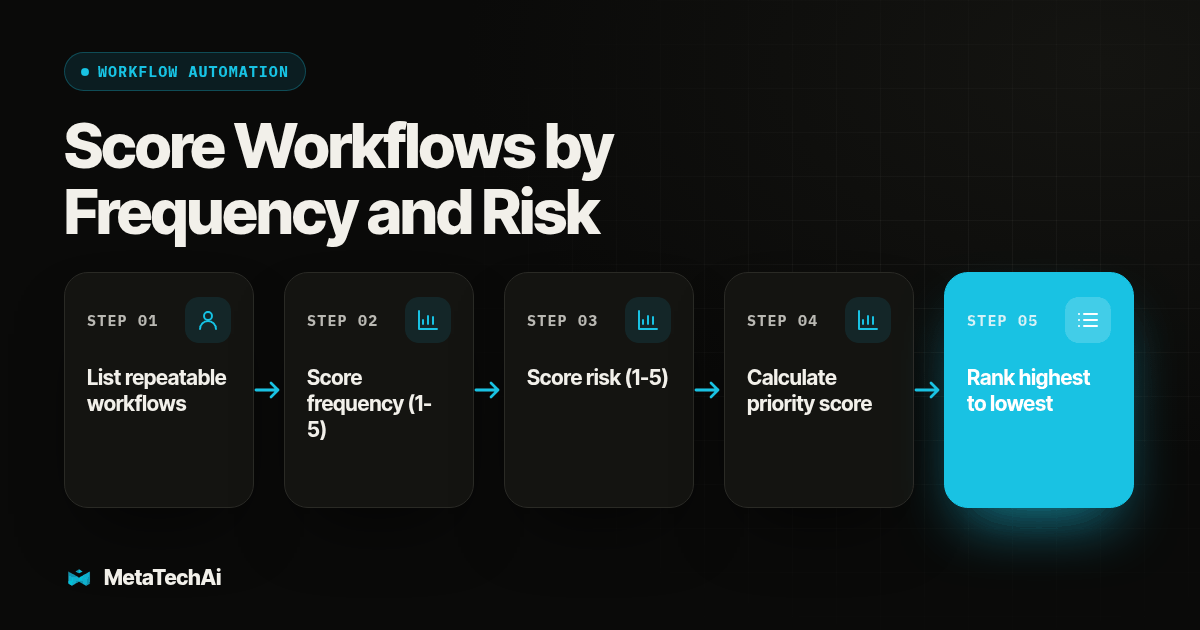
- List every repeatable step your sales and service team does in a normal week: the inbox replies, the reminder texts, the notes typed after a call, the fields updated in the CRM, the invoices sent.
- Score Frequency, one to five. A one happens a handful of times a month; a five happens multiple times a day.
- Score Risk, one to five. A one means a wrong output is harmless or obviously wrong on sight; a five means a wrong output could cost money, break a promise to a customer, or create a compliance problem before anyone notices.
- Calculate a Priority Score: Frequency multiplied by (6 minus Risk). A workflow that scores Frequency 5 and Risk 1 gets a Priority Score of 25. A workflow that scores Frequency 5 and Risk 5 gets a 5, even though it happens just as often.
- Rank every workflow from highest score to lowest. Automate the top of the list first, with a light spot-check while it proves itself. Anything scoring Risk 4 or 5 gets a required human approval step built in from day one, not bolted on after something goes wrong.
- Re-score once a quarter. Volume changes, and a workflow your team has watched run clean for three months can often move from "required review" to "spot-check," which is a separate decision from automating it in the first place.
That Risk multiplier is doing the real work here. McKinsey's research on intelligent automation frames the decision explicitly as balancing the returns of automating a process against the risk it introduces, not just chasing the biggest time saver on the list (McKinsey: Managing the risks and returns of intelligent automation). Zapier's own internal rollout framework states the same instinct as a rule its own teams follow: automate a manual task once you have done it three times (Zapier: AI Transformation Framework). Zapier's framework also routes anything above a set risk threshold through a tiered approval step instead of auto-approving it, the same split this guide's Priority Score is built to produce.
Copy this worksheet
Use this for every workflow candidate before you build anything:
Workflow: ____________________________________
Frequency (1-5): ____
Risk (1-5): ____
Priority Score (Frequency x (6 - Risk)): ____
Decision: Automate first / Automate with required review / Keep manual
Which six workflows score highest, and which should stay manual?
Here is how six common sales and service workflows score using that method, based on a typical service business sales process. Your own frequency numbers will differ by volume; the risk ratings are the part worth borrowing directly.
| Workflow | Frequency (1-5) | Risk (1-5) | Priority Score | Decision |
|---|---|---|---|---|
| Lead response acknowledgment | 5 | 1 | 25 | Automate first |
| Appointment scheduling and reminders | 5 | 2 | 20 | Automate first |
| CRM stage and activity updates | 5 | 2 | 20 | Automate first |
| Call summary drafting | 4 | 3 | 12 | Automate, required human review |
| Quote follow-up and reminders | 4 | 3 | 12 | Automate, required human review |
| Invoice and payment data entry | 3 | 5 | 3 | Keep manual or human-approved |
Lead response sits at the top for a structural reason, not a coincidence: a generic, fast acknowledgment is almost impossible to get catastrophically wrong, and it happens on every single inquiry. Once this guide identifies lead response as a priority, document the trigger, owner, and record that should change before configuring the workflow.
Call summaries and quote follow-up land in the middle because the AI output is useful but unverified. A drafted call summary can misquote a customer's stated budget or timeline, and a drafted follow-up message can accidentally promise a price change nobody approved. Both are worth automating for the time they save on the first draft; neither should reach a customer or a permanent record without a person glancing at it first.
Invoicing drops to the bottom of this list on purpose, even though it is a real time sink. A single wrong line item, duplicate charge or misapplied tax rate is not a quick fix once a customer has seen it, and it is the kind of error a busy team does not catch until a customer calls upset. That gap between "feels automatable" and "survives being automated unsupervised" is exactly what the Risk score exists to catch.
This table ranks workflows against each other, but if you only want the CRM-specific automations ordered on their own, our separate guide on the first five CRM automations for a service sales team covers that narrower question in more depth. This guide instead covers the broader workflow landscape around the CRM, including the lead response, scheduling and invoicing steps that sit outside it.
What happens when a team automates before the basics are proven?
A common trap is treating a custom AI-driven CRM build as the first automation project. A team can spend substantial effort designing the underlying system before proving that it solves the workflow bottleneck. Decide whether the system itself is the bottleneck before ranking automations inside it.
The workflow-scoring method in this guide assumes you already have a working CRM and are deciding what to automate inside it. If your team is still building the underlying system, that build is the actual bottleneck, and no amount of workflow prioritization fixes a tool that does not exist yet. Get the CRM itself stable first. Score workflows second. Bring the tool map and workflow candidates to AI infrastructure planning, which starts by mapping the business and selecting a bottleneck before configuration.
Whether that underlying system should be a custom build or an off-the-shelf tool configured to fit is its own decision, separate from which workflows to automate first inside it. See our comparison of a custom AI agent against an off-the-shelf tool for a service business before committing engineering time to either path.
What should stay manual even after everything else is automated?
Some decisions do not belong on this list at all, regardless of how they score. Pricing a custom scope of work, handling an angry customer, and any conversation where reading a person's tone changes what you say next, those need judgment a frequency-and-risk score cannot capture. Use the same rule across the sales process: automate the repeatable preparation, and keep consequential judgment with an accountable person.
A useful rule of thumb: automate the step, never the decision. A workflow that reminds a rep a quote is overdue is automation. A workflow that decides, on its own, to discount that quote to close the deal is a decision, and decisions involving money, scope or a customer relationship stay with a person who can be held accountable for the call. For a deeper look at exactly where that line sits across the full sales process, see our breakdown of sales process automation and what stays human.
Texting is a good example of where this split matters in practice. An automated lead acknowledgment text is low risk and worth sending instantly; a text that negotiates terms or confirms a refund is not. For text workflows, keep a person in the loop on anything a customer could reasonably dispute later. Our sister team at Beam has written about this exact boundary; see their breakdown of how an AI text message responder should and should not be automated. The message channel does not change the need for an approval boundary.
Not every automatable step needs to be built in-house, either. Some workflows, like detecting whether a call reached a live person or a voicemail, are narrow enough that a purpose-built tool handles them faster and more consistently than a general CRM workflow. RizzDial's proprietary voicemail detection runs in 0.66 milliseconds, built to connect a rep to a live person faster rather than leave them waiting on a dead line. That is a clean example of a low-risk, high-frequency task worth automating with a dedicated tool instead of a custom build.
How do you avoid breaking something that matters to the business?
Run every workflow that scores Risk 3 or higher through a short test before it goes live unsupervised:
- Pull 10 to 20 real past examples of the workflow, not hypothetical ones.
- Run the automation against each one and compare its output to what a person actually did at the time.
- Flag every mismatch, no matter how small, and sort the mismatches into "cosmetic" and "would have caused a problem."
- If any mismatch lands in "would have caused a problem," add a required human approval step before that workflow goes live, not after.
- Run the workflow live for two weeks with the approval step in place, logging every time a human catches something the automation got wrong.
- Only remove the approval step once two full weeks pass with no caught errors, and keep spot-checking afterward.
This is the same logic behind why MetaTech's own engagements are structured around a guarantee tied to conversions, not just activity: a workflow that looks automated on a dashboard means nothing if nobody checked whether it is actually working the way the team assumes. Teams that would rather hand the build and the two-week monitoring period to someone else can use our managed services instead of staffing it internally. AI infrastructure planning starts by mapping the business and selecting a bottleneck, then defining how a workflow should operate and where a person must approve an action.
What else do service teams ask before they turn on AI workflow automation?
How long does it take to roll out AI workflow automation across a sales team?
Build and test one workflow at a time instead of flipping on five at once. A narrow, low-risk workflow like a lead acknowledgment text can be live and tested within days; a workflow that touches money or compliance, like invoicing, needs longer review before it runs without a human checking every item.
Do we need new software, or can we automate with the CRM we already have?
Most of the six workflows in this guide run inside a CRM workflow builder you likely already pay for, using triggers, branching and wait steps. Check what your current CRM's workflow actions actually support before buying a separate automation tool.
What about compliance risk when AI touches invoices or customer records?
Treat any workflow involving money, medical, legal or regulated communication as a required-human-review workflow, not a fully automated one, no matter how many hours it would save. The point of scoring risk separately from frequency is to catch exactly these cases before they go live unsupervised.
How do you get a sales team to actually use a new automation once it is live?
Assign one named owner, run a short training session on the exact screens and triggers involved, check usage again after two weeks, and track a simple adoption number, not a feeling. A tool nobody was trained on gets ignored no matter how well it was built.
If an automated workflow starts causing problems, how hard is it to walk back?
That depends on whether you built required human review into the workflow from the start. A workflow with a human approval step before anything reaches a customer can be paused on that one step alone; an all-or-nothing automation with no review gate usually has to be shut off completely while you rebuild it.
Start with the three workflows at the top of the table above. They are the ones that save real hours without asking you to trust AI with a decision it should not be making alone, and they build the track record your team needs before the harder workflows are worth touching at all.